 Start Free Trial
 What is INP on Shopify?
INP is the wait after a shopper taps a different finish on a product and before the screen changes. Shopify already times it on real visits, and one look at your own lamp page tells you whether it needs any work.

Edward Cameron · Founder, Whoosh
7 min read

In short
INP, short for Interaction to Next Paint, is the wait after a shopper taps something on a page that is already open, until the screen changes to show the tap worked. On a Shopify product page, it is the moment between tapping the brass finish on a white ceramic lamp and seeing the brass lamp. Shopify already times it on real visits in the Web Performance dashboard in your admin. Good is 200 milliseconds or less.
- INP is the wait between a shopper tapping something on a page that is already open, like the brass swatch under a white lamp, and the screen changing.
- It is not the wait for the first photo. The white lamp is already on screen when the clock starts, and the clock stops at the first change, not when the brass photo finishes downloading.
- Shopify already times that tap on real shoppers' phones and shows it in the Web Performance dashboard. Good is 200 milliseconds or less across three out of four visits, so one quick tap on your own phone is not the score.
- If the brass swatch answers straight away and the dashboard agrees, leave the tap alone. If it hangs, start with the apps nobody uses any more.
A shopper taps the brass swatch on your table lamp
INP on Shopify is the wait after a shopper taps something on a page that is already open, until the screen changes to show the tap worked. The clearest example on most stores is choosing a different version of a product and waiting to see it. The full name is Interaction to Next Paint, and you will mostly see it written as INP.
Let’s stay with one product the whole way through. A shopper is on your ceramic table lamp, and the matte white finish is on screen. They like the shape, but their living room is full of brass handles, so they tap the brass swatch under the photo.
What they want next is simple. The brass swatch gets its outline, the name beside the price changes to Brass, and the photo becomes the brass lamp. When that happens straight away, nobody notices, and when the white lamp just sits there for a beat, the shopper taps again or starts to wonder whether the page is broken.
This is not the wait for the first photo. The white lamp was already on screen when they tapped, so the wait for that first photo is a different one, with a different fix. INP starts at the tap.
It also covers most of the visit. Shopify’s notes on INP say Chrome’s data shows 90 percent of the time people spend on a page comes after it has loaded, and that is when the brass swatch gets tapped.
What the shopper is waiting for, and how Shopify times it
So what is the phone doing while the shopper waits for brass? It does three things in order, and any one of them can be the slow part.
First, the phone has to be free to notice the tap. If an app’s program is busy with something else at that moment, like a review widget or a tracking tag, the tap waits in line until that job is done.
Shopify’s notes on INP describe exactly this: when another app’s program is in the middle of a long job, the phone cannot start on the tap until that job ends.
Next, your theme runs the part of its program that knows about brass. It changes the name, the price if brass costs more, whether brass is in stock, which photo to show, and the words on the button under it, all at once. Then the phone draws the new screen.
The clock stops the moment the screen first changes, like the brass swatch getting its outline. Google’s guide to INP says it measures how long the next update on screen is held up, not every later effect of the tap, so it does not wait for the brass photo to finish downloading.
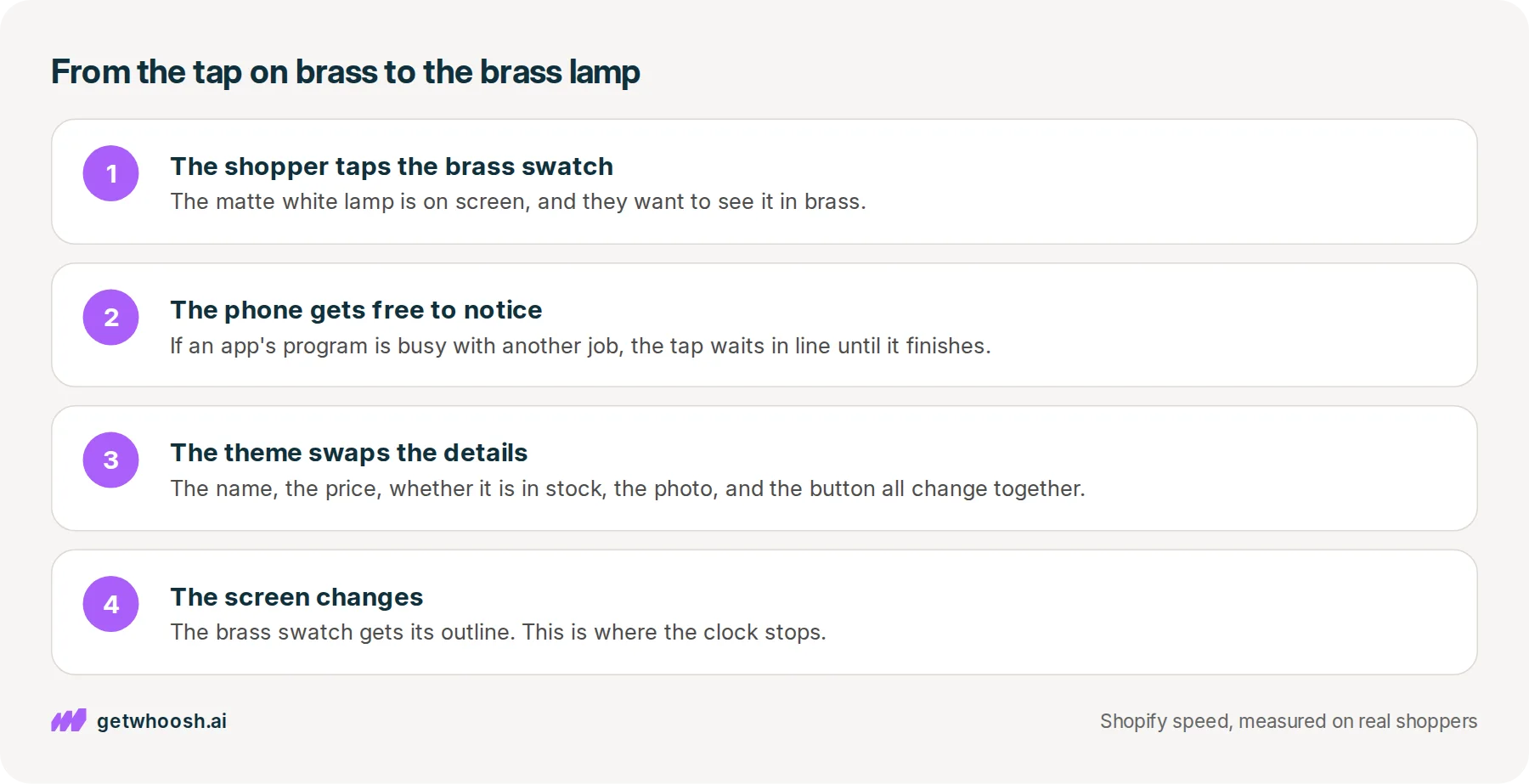
How does Shopify know how long that took? It times taps like this on real shoppers’ phones, from Chrome users who agreed to share these numbers, and puts the result in the Web Performance dashboard, which Shopify’s notes on testing say you open from your Shopify admin. The numbers are split by page type and by phone or computer, so you can look at product pages on phones.
Shopify does not keep the first tap of a visit. Shopify’s notes on INP say the number for a visit is its worst tap, or close to it, and the list of slow taps on a store starts with this one, choosing a variant. A variant is Shopify’s word for one version of a product, like the brass lamp beside the white one.
Then there is the line the number is judged against. Shopify’s INP notes put good at 200 milliseconds or less and poor above 500 milliseconds, both judged at the 75th percentile of visits. Put plainly, line up every visit to the lamp, and three out of four have to answer even their slowest tap within a fifth of a second for the page to count as good.
Check your store's real numbers
The free Whoosh audit measures your store on real shopper data, names the scripts in the way, and estimates what the delay is costing. No install, about a minute.
Free. No install. Results in about a minute.
Why the dashboard lets you leave the tap alone
The useful part is what you no longer have to do. You do not have to buy a tool to time the brass swatch, and you do not have to guess from your own phone, because Shopify is already timing it on the phones your shoppers carry.
I know what you’re thinking. You tapped brass on your phone and it changed straight away, so surely the tap is fine.
It might be, but your phone may well be newer than a lot of your shoppers’ phones, it is on your home wifi, and it is one visit. That is why Shopify’s INP notes say a single fast tap in a test does not tell you whether you meet the line.
Your phone tells you the swatch works. The dashboard tells you whether it works for the shopper on an older phone on the bus.
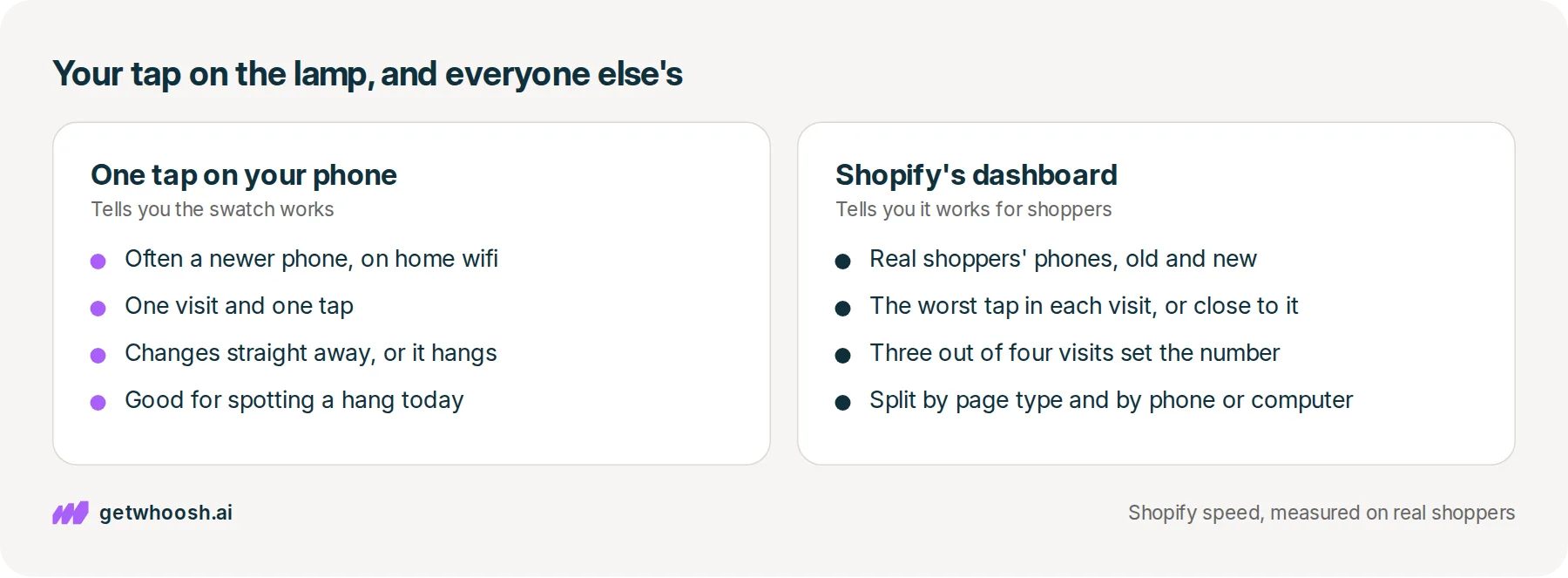
So if the dashboard says the tap on product pages is good, you can stop worrying about it and spend the afternoon on something else.
If it is slow, the swatch and the lamp photo are rarely the cause. Shopify’s notes on theme performance say the programs from your theme and your installed apps share the phone with the job of answering a tap, and too much of that is one of the main reasons a tap is slow.
That leaves two endings. A good number means the brass tap is not your problem today. A slow one means something else on the page is busy when the shopper taps, and that is where you look next.
Tap brass on your own lamp page, then read the number
Here is the check, in the order you would do it. It takes a few minutes, with your phone first and then the admin.
-
On your phone, open the live lamp page from a normal link. A private tab is fine, and it shows you what a new shopper sees.
-
Tap the brass swatch once and watch the screen. The outline, the name, and the photo should all change straight away.
-
Tap back to white, then brass again, so you are not judging the whole product page on a single tap.
-
In your Shopify admin, open the Web Performance dashboard that Shopify’s notes on testing describe, and look at INP for product pages on phones.
If the outline moved straight away but the brass photo took a second to fill in, the tap is fine and the photo file is the slow part. That one comes down to which copy of the photo the theme asks for, not to the tap.
So where does Whoosh fit? Not on this tap, and I would rather say that plainly. On the stores we measure, the typical store’s tap time on real visits, at that same three out of four line, was about 130 milliseconds with Whoosh on and about the same with Whoosh off, and both are already inside the good band.
Whoosh does the wait before this one. It puts your other apps’ programs in order so they do not race the white lamp photo when the page opens, loads that photo early, and gets the likely next page ready. The sequencing part, Smart App Loading, is US$99 a month on the Shopify App Store, with a 7-day free trial.
Back to the brass swatch. If it changed straight away on your phone and the dashboard puts product pages inside the good band, you can stop here, because you do not need an app for a tap that already answers.
If it hangs, the next suspect is an app that does something when a shopper taps, and Whoosh is not the evidence that the hang will stop. Shopify’s notes on INP say to go through your installed apps, remove the ones you no longer use, and check whether an app you already removed is still putting code on the page.
Take out the unused ones one at a time, and tap brass on your phone after each, so you know which app was holding up the lamp.
Questions merchants ask
Is INP the same as how fast my product page loads?
No. Loading is the wait for the white lamp to appear when someone opens the page. INP is the wait after that, when they tap the brass swatch and wait for the screen to change. A page can load quickly and still feel slow to tap, and the fix for each one is different.
The brass swatch changes straight away on my phone. Why would the dashboard disagree?
Your phone is one visit, often on a newer phone and fast wifi. The dashboard is real shoppers on all kinds of phones, and the number is set by three out of four of those visits. If the two disagree, trust the dashboard, and try the tap again on an older phone if you have one.
Which taps does INP count on my product page?
Every tap, click, and key press during the visit counts. The number for that visit is the worst one, or close to it, not the first. On a product page, choosing a different finish or colour is the tap Shopify lists first among the slow ones.
Do I have to uninstall apps to fix a slow tap?
Only the ones nobody uses. Start there, and check that an app you removed is not still putting code on the page. Keep the apps you rely on, and tap the brass swatch again on your phone after each change so you can see what moved.
Sources (5, checked 15 Oct 2026)
- 1 Shopify developer docs on optimizing for INP (shopify.dev, checked 15 Oct 2026)
- 2 Shopify developer docs on testing for performance (shopify.dev, checked 15 Oct 2026)
- 3 Google's guide to Interaction to Next Paint (web.dev, checked 15 Oct 2026)
- 4 Shopify developer docs on theme performance (shopify.dev, checked 15 Oct 2026)
- 5 Whoosh on the Shopify App Store (apps.shopify.com, checked 15 Oct 2026)
The thresholds, the variant example, and the Web Performance dashboard come from Shopify's developer notes and Google's guide to INP, checked on 15 Oct 2026. The tap time with Whoosh on and off is the typical store among the stores we measure, from real visits. The ceramic lamp is an example, not a real store.
How posts are chosen, sourced, checked and corrected: our editorial policy.
Written by Edward Cameron Founder, Whoosh, Sydney, Australia
Edward Cameron is the founder of Whoosh, the Shopify speed app made in Sydney and on the Shopify App Store since August 2025. He writes here about what slows a Shopify product page and how to check it on your own store.
Keep reading
All posts
Apps & scripts 7 min read
Does site speed affect conversion rate?
A visit where the product page finishes loading fast turns into an order about twice as often as a slow one, on the stores we measure. Turning Whoosh on put more visits in the fast group and did not raise the rate.

Apps & scripts 7 min read
Why is my Shopify store slow?
Shopify already runs fast servers and shrinks your photos. What a shopper often sees first is a chat bubble or popup you switched on in the theme, and the switch to check is in one list in the theme editor.

Apps & scripts 6 min read
Why Shopify image optimization still leaves photos slow
Shopify already makes small, light copies of the product photo you upload. The shopper still waits when the theme asks for the biggest copy, or makes the first photo queue behind the rest of the gallery.
