 Start Free Trial
 Do you need a Shopify CDN, or do you already have one?
Your Shopify store already sends each product photo from a computer near the shopper, so a report telling you to add a CDN is asking you to buy something you have. The part worth checking is whether the photo was uploaded to Shopify or pasted in from somewhere else.

Edward Cameron · Founder, Whoosh
6 min read Updated

In short
Every Shopify store already has a CDN, short for content delivery network. Shopify keeps copies of each photo you upload on computers around the globe, so a shopper overseas gets the one nearest them, and you do not buy or set up a second one. A product photo can still be slow, or stuck on an old version, when it was pasted in as a link instead of uploaded. That is the part to check.
- You already have a CDN. Shopify keeps copies of every uploaded photo near your shoppers, so you do not buy another one.
- A photo pasted in from another website makes the phone set up a whole new connection before the picture starts to arrive.
- A pasted Shopify photo link can keep showing the old picture after you replace the file in the admin.
- Right-click the product photo, choose Inspect, and read its address. Your store name with /cdn/, or cdn.shopify.com, means it is on Shopify.
Someone in London taps your candle
Do you need a Shopify CDN? No. Your store already has one, and it has been running since the day you opened.
Say you sell candles from Brisbane, and a shopper in London taps the photo of your sandalwood candle. That picture does not fly all the way from Australia. Shopify has already put a copy of it on a computer near London, so it only has to cross town to reach their phone.
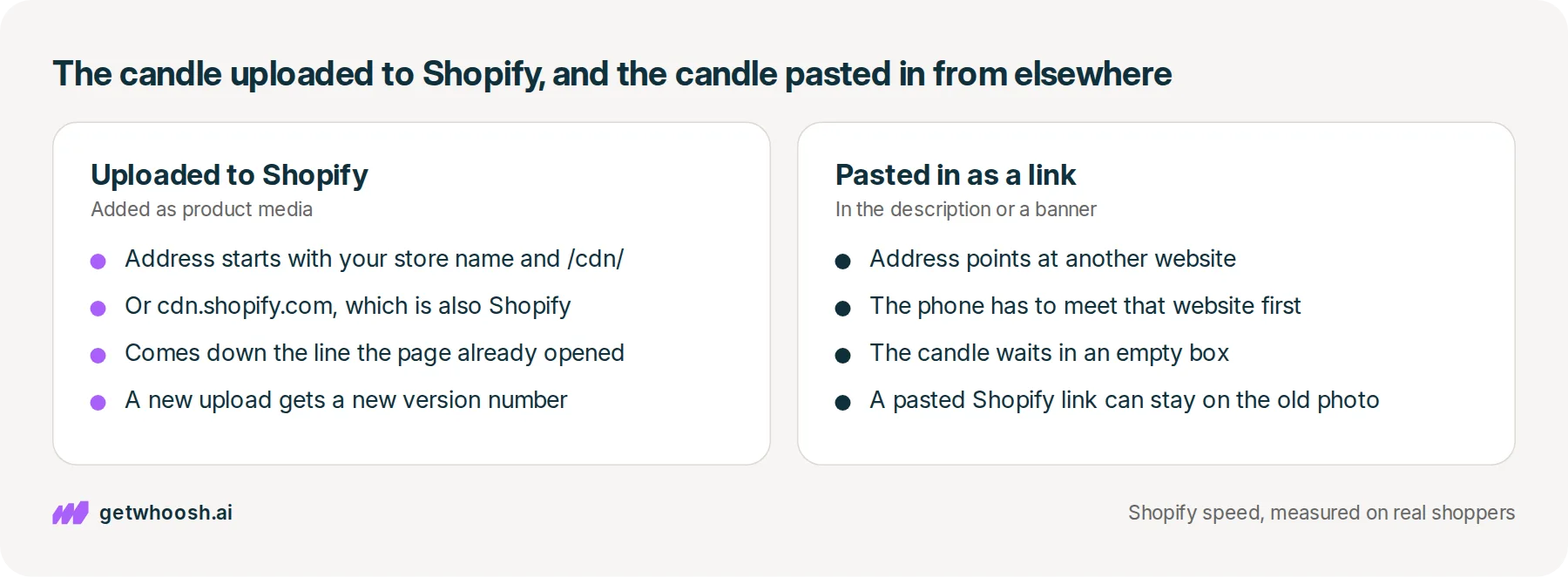
That setup is what people call a CDN, short for content delivery network. So when a speed report says your store should add one, it is asking you to pay for a job Shopify is already doing. The question worth your ten minutes is a smaller one: did the candle photo go into Shopify, or is it coming from somewhere else?
How the candle photo gets to London
When you add a photo in the product’s media section, Shopify keeps copies of it on computers in cities around the globe, and each shopper’s phone gets the closest one. Shopify’s notes on its platform say that is why a store loads quickly for people far away, and there is nothing for you to switch on.
You can see this in the photo’s address, which is the web link the phone uses to fetch the picture. On most Shopify stores it starts with your own store name and then /cdn/, something like /cdn/shop/files/sandalwood.jpg. Some photos still use cdn.shopify.com instead, and that is Shopify too.
Why does your store’s own name help? The phone already opened a line to your store to load the page, so it can ask for the candle down that same line instead of starting over with a website it has never met.
There is one more thing the address carries, and it matters in a minute. When you upload a new photo, Shopify adds a fresh version number to the end of the address, after ?v=, so every phone can tell it is a different picture. Your theme picks up that new number by itself, because it asks Shopify for the current photo each time the page opens.
Check your store's real numbers
The free Whoosh audit measures your store on real shopper data, names the scripts in the way, and estimates what the delay is costing. No install, about a minute.
Free. No install. Results in about a minute.
Why the candle can still be slow or out of date
So if Shopify does all of that, how can the candle still be slow?
The network only carries what you put on it. Sometimes the photo on the page was never uploaded at all. It is an image pasted into the description, or a banner that still points at the photographer’s website or your old store.
Then the phone in London has to find that other website, open a fresh connection, and set up the padlock you see in the address bar, all before the first bit of the candle arrives.
Shopify’s guide to serving files from its own network puts that setup at nearly half a second on a mobile connection with 150 ms of delay, and every extra website repeats it. When the file is the main product photo, the shopper spends that time looking at an empty box where the candle should be.
The second problem happens on Shopify’s own address, and it is easy to miss. Since 7 April 2026, Shopify no longer clears the old copy when you replace or delete a file in the admin.
Your theme asks for the current photo and gets the new version number, so it shows the new candle. A cdn.shopify.com link you pasted into a description or a blog post has no new number, so shoppers keep seeing yesterday’s photo until the old copy runs out.
Here is the useful part. Both problems come from the same place, a photo that sits on the page as a pasted link rather than an upload Shopify looks after, and buying a CDN fixes neither.
I know what you’re thinking. A speed tool you trust flagged “no CDN”, so surely it found something. It may well have found a heavy file or a slow app, but it is wrong about the network.
Shopify’s own guide to CDNs says that when your platform already includes one, a separate one might be redundant. The same guide names where a separate one earns its keep: custom caching rules, or special routing for video, that your host does not offer. A candle photo needs neither.
Read the photo’s address, then let it load first
Here is the check, and it takes a couple of minutes on a computer.
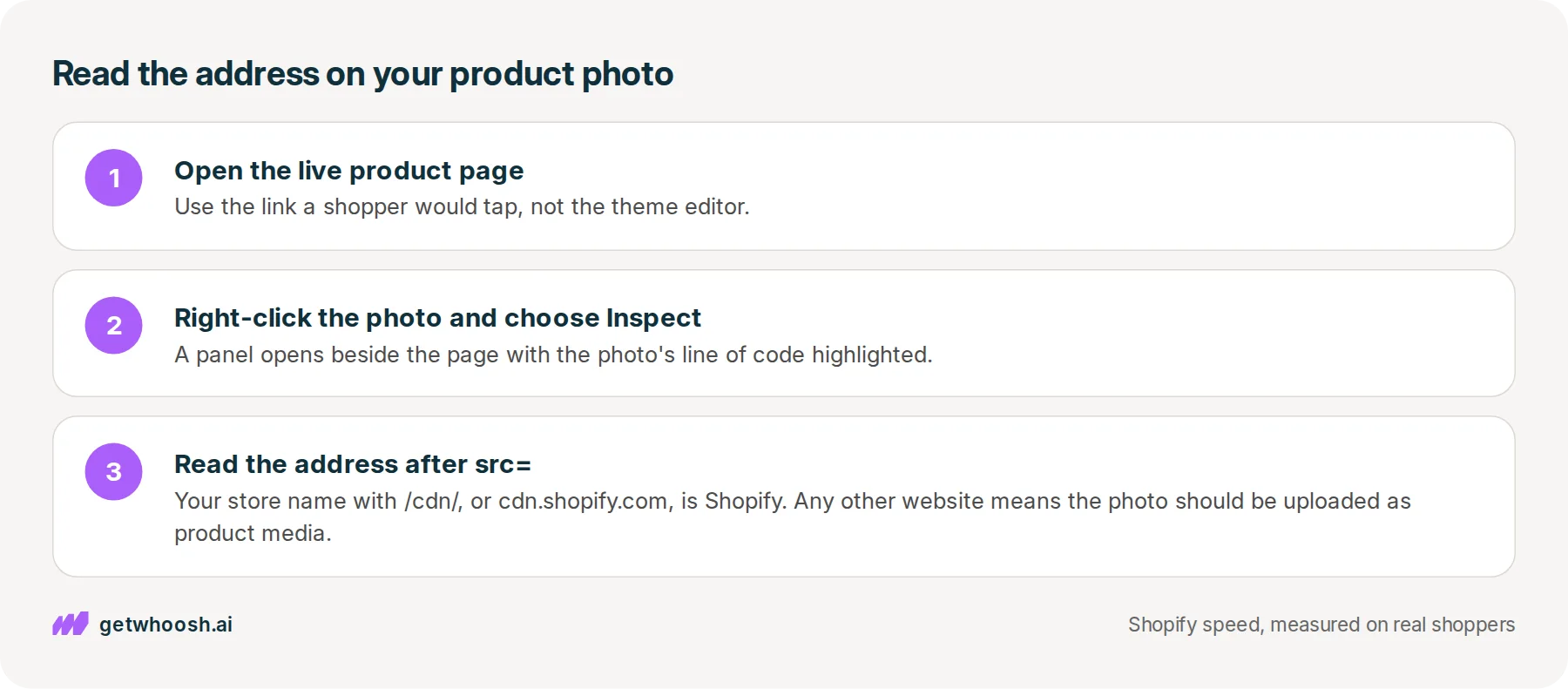
Open the live product page, using the same link a shopper would tap rather than the theme editor. Right-click the candle photo and choose Inspect, which opens a panel beside the page with the photo’s line of code highlighted. The address is the part after src=.
If that address starts with your store’s name and has /cdn/ in it, or starts with cdn.shopify.com, the photo is on Shopify and this part is done. If it starts with any other website, save that image, add it to the product through the media section, and delete the pasted copy from the description.
If you replaced a photo and the live page still shows the old one, open the product description and click the <> button to see the code behind it. Look for a pasted cdn.shopify.com address, take that image out of the text, and add it as product media, so the page asks Shopify for the current file.
Now, the part the network does not touch. It carries your files quickly, but it does not decide what the phone does first. Your signup popup, reviews widget, and chat bubble each load a small program from the company that makes them, and those programs can start running while the candle is still an empty box.
That order is the one job Whoosh does. Smart App Loading holds those app programs until the product photo is on screen, then lets them run, and it works alongside the apps without removing them or copying your theme. After you turn it on, open the popup and send the form, open the chat, and add the candle to the cart, so you know each one still works.
Smart App Loading is US$99 a month with a 7-day free trial, and Nakie’s published case study shows their page load going from 4.8 seconds to 1.35 seconds.
You can stop when the candle’s address is your store or cdn.shopify.com, and a replaced photo shows up on the live page. If the address is right and the photo is still slow, the next suspect is its size, which is why Shopify image optimization still leaves photos slow. If a signup form is what jumps in front of it, start with whether Klaviyo slows your store. The FAQs cover what an install changes, and the speed check measures your product page for you.
Questions merchants ask
Should I put Cloudflare in front of my Shopify store?
Your store already goes through it. Shopify's platform notes say its network is backed by Cloudflare, so your product photos are served that way today. Shopify's guide to CDNs says a second network on top of a built-in one might be redundant. Leave it unless you need custom caching rules or special routing for video.
Is an image address on cdn.shopify.com a problem?
No. That is Shopify, the same network as your own store name with /cdn/ in the address. It only causes trouble when the link was pasted into a description or a blog post, because a pasted link keeps showing the old photo after you replace the file.
Most of my shoppers are overseas. Do I need a CDN for them?
No. A shopper far from you is who Shopify's network is for, since it keeps copies of your photos on computers around the globe. What still slows them down is a photo that lives on another website, so read the photo's address before you pay for anything.
Do I have to uninstall my popup, reviews, or chat app?
No. Those apps still do their jobs, and their programs still come from the companies that make them. Holding them until the product photo is up does not delete them. Afterwards, send the popup form, open the chat, and add a product to the cart to make sure each one works.
Why does PageSpeed still flag my images if Shopify has a CDN?
The network shortens the trip. It does not choose how big a copy your theme asks for, or what else runs before the photo appears. If the address is on Shopify and the photo is still flagged, look at its size next.
Sources (4, checked 28 Sept 2026)
- 1 Shopify developer docs on the Shopify platform (shopify.dev, checked 28 Sept 2026)
- 2 Shopify developer docs on serving files from the Shopify CDN (shopify.dev, checked 28 Sept 2026)
- 3 Shopify changelog on replacing a file and its old CDN address (shopify.dev, checked 28 Sept 2026)
- 4 Shopify blog on what a CDN is (shopify.com, checked 28 Sept 2026)
How Shopify's network delivers photos, the connection delay for other websites, and the April 2026 change to replaced files come from Shopify's own docs and changelog. The candle is an example, not a real store, and there is no unpublished store data.
How posts are chosen, sourced, checked and corrected: our editorial policy.
Written by Edward Cameron Founder, Whoosh, Sydney, Australia
Edward Cameron is the founder of Whoosh, the Shopify speed app made in Sydney and on the Shopify App Store since August 2025. He writes here about what slows a Shopify product page and how to check it on your own store.
Keep reading
All posts
Apps & scripts 6 min read
Why Shopify image optimization still leaves photos slow
Shopify already makes small, light copies of the product photo you upload. The shopper still waits when the theme asks for the biggest copy, or makes the first photo queue behind the rest of the gallery.

Apps & scripts 6 min read
Does Klaviyo slow down your Shopify store?
You added Klaviyo so you can reach shoppers after they leave. That needs a small program on the product page, and it only slows the store when it starts before the product photo.

Apps & scripts 7 min read
What does an image optimizer app do on Shopify?
An image optimizer rewrites the photo stored in your Shopify admin, while Shopify still makes the light copy the shopper's phone downloads. The part worth paying for is the file name and the short description, and it is the wrong buy when the photo is slow to appear.
