 Start Free Trial
Does Shopify collection schema list your products?
A shopper opens your Dinner plates collection. Behind the page sits a hidden note for search engines, and on Dawn it names your store, not the plates. Here is where the plate's own note lives, and the two searches that show you both.

Edward Cameron · Founder, Whoosh
6 min read

In short
Shopify collection schema is the hidden note in a collection page's source that tells search engines what the page is. On Shopify's Dawn theme, the Dinner plates collection carries one note, from the header, and it names your store, not the plates. The note about one plate is written on that plate's own page by Shopify's structured_data filter. Check both in View page source: ItemList on the collection, then the Product note on the plate.
- On Dawn, the only hidden note on a collection page is the header's Organization note, which names your store and appears on every page.
- Dawn's collection grid draws the plate cards and the page numbers, and writes no list of the plates for search.
- The plate's own page carries a Product or ProductGroup note, written by Shopify's structured_data filter, with the plate's name, price, and stock.
- Google's product page says that note on product pages is what lets price and availability show in search. Its carousel page does not list products as a supported type.
- The check is two searches in View page source: ItemList and Organization on the collection, then the product note on the plate.
A shopper opens your Dinner plates collection
A shopper wants a set of four dinner plates, and they land on your Dinner plates collection, the page that shows every plate you sell in one grid. Behind that page, in its source (the raw text your store sends to the browser), sits a hidden note that tells search engines what the page is. On a store running Dawn, Shopify’s own free theme, the note on that collection names your store, not the plates.
The note about a plate lives somewhere else, on that plate’s own page. People call these hidden notes schema, and the format Shopify writes them in is called JSON-LD. So if you came looking for Shopify collection schema, the honest answer on Dawn is one short note about the shop, and no list of the plates.
The shopper never sees any of it. They see the plate cards, the prices, and the page numbers at the bottom, and they tap the matte charcoal dinner plate because it looks like the one they pictured. That tap, from the collection to the plate, is also the line between the two notes.
What Shopify writes on the collection, and on the plate
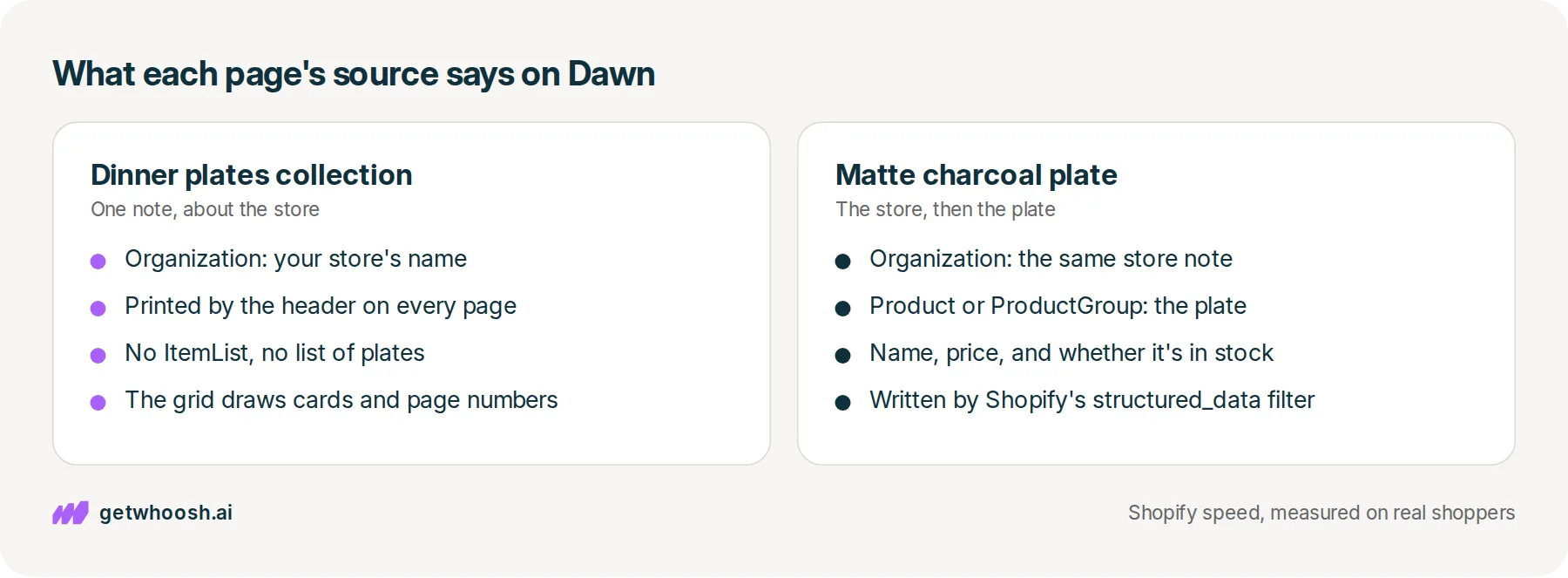
So what is written behind the Dinner plates page? Start at the top, with the strip that holds your logo and menu. Dawn’s header file prints a note there that says this is an organisation and gives your shop’s name, and because the header is on every page, so is the note. Its type is Organization.
The same header file adds a second note, a WebSite note with a search box in it, but it only prints that one when the page is your homepage. The Dinner plates collection never gets it.
Now the grid of plates underneath. Dawn’s collection grid file draws the plate cards and the page numbers, and it has no hidden note in it at all. Nothing on that page lists the plates for search, so the store’s note from the header is the only one there.
Then the shopper taps the charcoal plate, and the plate’s page is different. Dawn’s product section hands the plate to a small Shopify tool called the structured_data filter, and puts what comes back inside a hidden note. The filter writes that note for you from the plate’s details in your admin.
If the charcoal plate is sold on its own, or as a set of four, those are two choices on one page. Shopify’s page on the structured_data filter calls those choices variants, and it writes a product with choices as ProductGroup. A plate with no choices comes out as Product. The same page says the filter works on a product and on an article, and a collection is not on that list.
The example on that same filter page shows what goes inside: the product’s name, its price and currency, and whether it’s in stock. So the collection names the store. The plate’s page names the plate.
Check your store's real numbers
The free Whoosh audit measures your store on real shopper data, names the scripts in the way, and estimates what the delay is costing. No install, about a minute.
Free. No install. Results in about a minute.
Why the charcoal plate’s page is the one that carries the price
Here’s the part that changes where you look. Google’s page on product structured data, last updated 10 December 2025, says you add this note to your product pages, and then price, availability, review ratings, and shipping can show right in the search results.
That extra detail sits with the plate’s blue link and the grey sentence under it. Those two lines have their own boxes in the admin, and this post stays on the hidden note. The page Google is asking about is the charcoal plate’s page, and on Dawn, Shopify already writes that note there.
So what about the collection? You may have read a guide that says every collection needs a list note, an ItemList, so your plates show up as a row of results in Google. Google’s carousel page, last updated 8 September 2026, is where that row is described, and it names the supported types as Course, Movie, Recipe, and Restaurant. A dinner plate is none of those, so that page has nothing to show for a list of plates.
That doesn’t mean the plates are hidden from Google either. Each plate on the Dinner plates page is still an ordinary link to its own page, the same link the shopper tapped. A hidden list would be a second note sitting on top of those links, not a replacement for them.
So the collection sells the range, and the plate’s own page carries the facts. Leave the collection’s store note alone, and make sure each plate’s page has its product note.
Read the Dinner plates source, then the charcoal plate’s
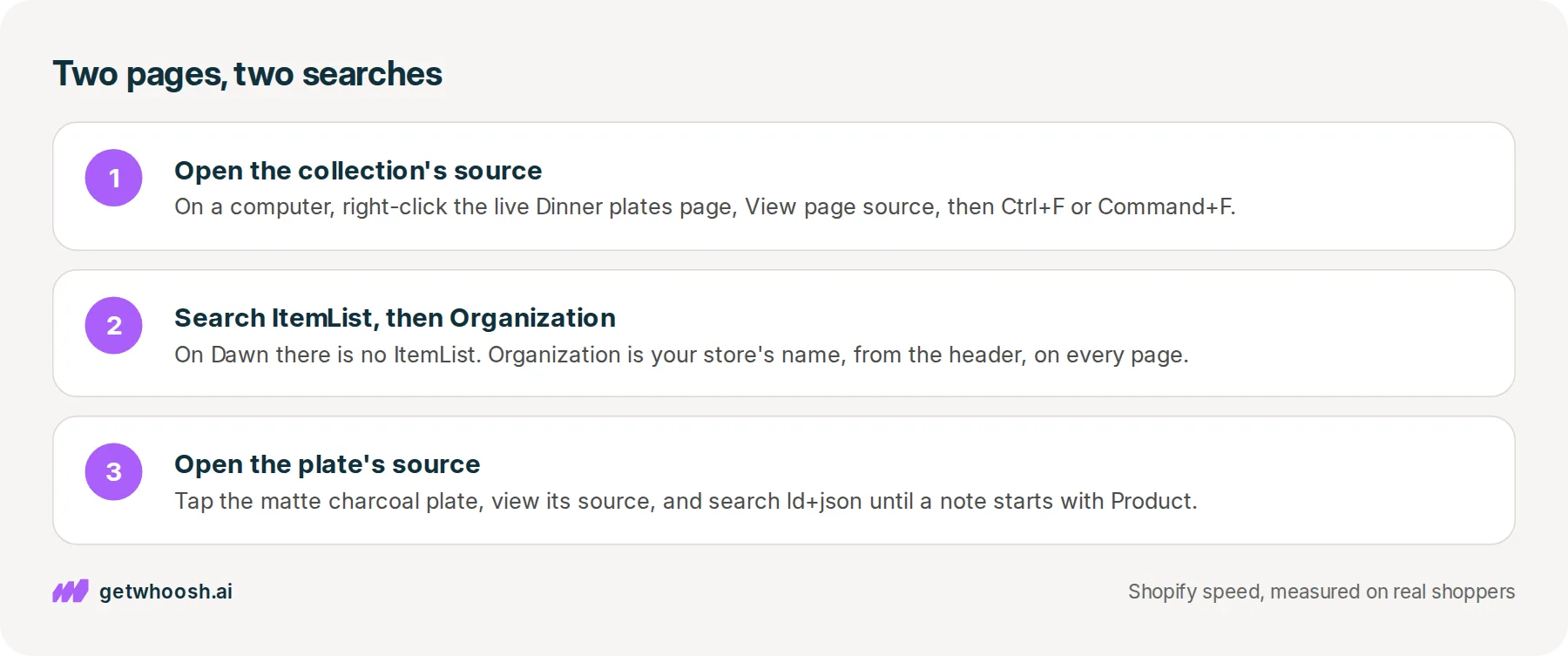
Let’s start on the collection. On a computer, open the live Dinner plates collection, right-click an empty spot, and choose View page source, which opens the raw text of that page in a new tab. Press Ctrl+F, or Command+F on a Mac, so you can search it.
Search for ItemList first, and on Dawn you won’t find it, because the collection grid doesn’t write one. Then search for Organization, and you’ll land on one note with your store’s name in it.
That’s the header’s note, and it’s on every page of your store. Finding it on the collection doesn’t mean the collection listed the plates. It means the header did its usual job.
Next up, the plate. Go back to the collection, tap the matte charcoal dinner plate, and open View page source on that page. You could search for Product, but that word turns up all over a product page’s code, so search for ld+json instead. That’s the label at the start of every hidden note, and pressing Enter moves you from one note to the next.
One of them is the store’s Organization note again. Another starts with Product, or ProductGroup if the plate comes single or as a set of four, and you’ll see the plate’s name and price inside it. That’s the note Shopify’s filter wrote for you.
If your theme isn’t Dawn, the same two searches are still the check. Your theme may print a different set of notes, but you’re asking the same two questions: does the collection’s source list the plates, and does the plate’s own source carry a product note?
And no, you don’t need an app to answer them. Whoosh doesn’t write these notes, and nothing here needs installing. Your theme writes them, and two searches show you whether it did.
You can stop when the Dinner plates source has your store’s name and no list of the plates, and the charcoal plate’s own source has its product note. If the plate’s page has no product note at all, raise that with whoever built or sells your theme, because that’s the page Google’s product guide is about.
Questions merchants ask
Does the hidden note change what shoppers see on the collection?
No. The note sits in the page source, where only browsers and search engines read it. The shopper on the Dinner plates collection still sees the same plate cards, prices, and page numbers whether a note is there or not.
Is it a problem that the store's Organization note is on every page?
No. Dawn's header prints it on every page on purpose, so each page carries the store's name. It tells search engines who runs the store. It just isn't a list of the plates, so don't read it as one.
My plate's note says ProductGroup, not Product. Is that wrong?
No. Shopify's filter page says a product with variants is written as a ProductGroup. If the charcoal plate comes single or as a set of four, those are variants, so ProductGroup is the note Shopify is meant to write.
Do I have to write the note myself when I add a new plate?
Not on Dawn. The product section runs Shopify's filter on every product page that uses it, so a new plate gets its note from the details you enter in the admin. Run the ld+json search on the new plate's page once it is live to see it.
Sources (6, checked 18 Nov 2026)
- 1 Shopify developer docs on the structured_data Liquid filter (shopify.dev, checked 18 Nov 2026)
- 2 Google Search Central on product structured data (developers.google.com, checked 18 Nov 2026)
- 3 Google Search Central on carousel structured data (developers.google.com, checked 18 Nov 2026)
- 4 Shopify Dawn theme header section on GitHub (github.com, checked 18 Nov 2026)
- 5 Shopify Dawn theme collection product grid section on GitHub (github.com, checked 18 Nov 2026)
- 6 Shopify Dawn theme product section on GitHub (github.com, checked 18 Nov 2026)
The Dinner plates collection and the matte charcoal plate are an example, not a real store. What Dawn prints comes from its header, collection grid, and product files on GitHub, the filter from Shopify's developer docs, and what search can show from Google's product and carousel pages.
How posts are chosen, sourced, checked and corrected: our editorial policy.
Written by Edward Cameron Founder, Whoosh, Sydney, Australia
Edward Cameron is the founder of Whoosh, the Shopify speed app made in Sydney and on the Shopify App Store since August 2025. He writes here about what slows a Shopify product page and how to check it on your own store.
Keep reading
All posts
Agentic commerce 6 min read
What Shopify title tag length should a product use?
A shopper on a phone searches for a weekender bag and reads a column of blue links. Each one is a title tag, and the phone cuts the end off. Here is how long yours should be, and what has to come first.

Agentic commerce 6 min read
What is a good meta description example for a Shopify product?
A shopper searching for a spatula reads the short line under each Google link before they tap. Here is Shopify's own example of that line, why the first words matter most, and where you type yours.

Agentic commerce 7 min read
What does Shopify robots.txt GPTBot control?
A shopper asks ChatGPT for a navy wool blanket. Whether OpenAI may read your blanket page is in one small file at your store's address plus /robots.txt, and the GPTBot line in it is about training, not about whether she finds you.
