 Start Free Trial
 What does Shopify robots.txt GPTBot control?
A shopper asks ChatGPT for a navy wool blanket. Whether OpenAI may read your blanket page is in one small file at your store's address plus /robots.txt, and the GPTBot line in it is about training, not about whether she finds you.

Edward Cameron · Founder, Whoosh
7 min read

In short
Your store's robots.txt file is a short note at your own domain plus /robots.txt that tells named crawlers, the programs companies send to read web pages, what they may read. GPTBot is OpenAI's crawler for training its AI models, so blocking it does not take your products out of ChatGPT search. OAI-SearchBot decides that. If neither name is in your file, Shopify's default rules already let both read your public pages.
- GPTBot is OpenAI's crawler for training its AI models, so blocking it keeps your pages out of training, not out of ChatGPT search answers.
- OAI-SearchBot is the reader behind ChatGPT search, and OpenAI says sites that block it are not shown in those answers.
- Shopify's default robots.txt allows public pages such as products and collections, so a crawler the file does not name, GPTBot included, can already read them.
- Open your own domain with /robots.txt on the end and look for GPTBot and OAI-SearchBot. If neither is named, leave the file alone.
She asks ChatGPT for a navy wool blanket
A shopper asks ChatGPT for a navy wool blanket, and whether GPTBot may read your blanket page is written in one small file on your Shopify store, at your own domain with /robots.txt on the end. GPTBot is the program OpenAI sends to read pages so its models can learn from them, which is what people mean by training. Saying no to it does not take the blanket out of ChatGPT’s search answers, since a second OpenAI reader, OAI-SearchBot, decides that.
Picture her on a cold night, asking for one that fits a queen bed. One way OpenAI finds your blanket is that reader visiting the store and copying the page. Before it asks for the page, it checks the note at /robots.txt.
The reader visits pages one after another the way a person would, only without the scrolling. People call that a crawler. Before a named crawler asks for any page, it reads the robots.txt file first.
Think of it as the note on the shop door that says who may come in and which rooms are staff only. Shopify generates that file for every store by default, so yours already has one, even if you have never opened it.
Two OpenAI readers, two reasons to read the blanket page
OK, so OpenAI does not send one reader to the blanket page. It sends two that matter here, and each one comes for a different reason.
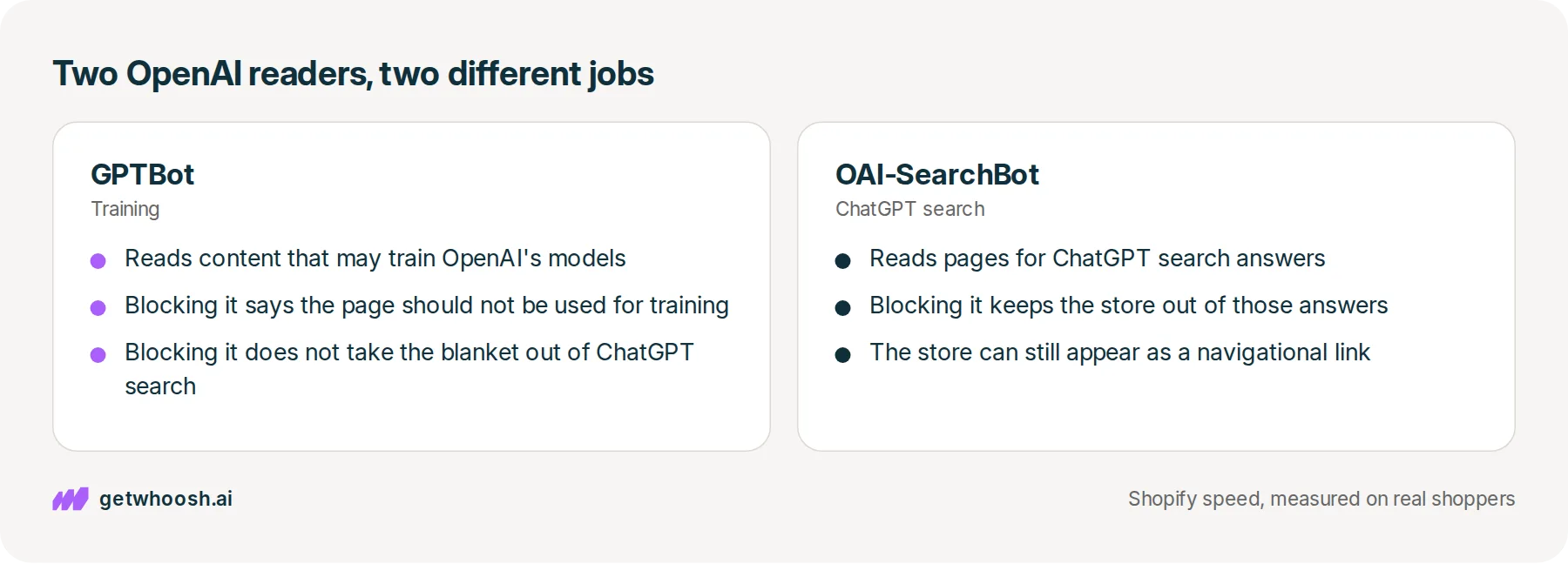
The first is GPTBot. OpenAI’s page about its crawlers says GPTBot reads content that may be used to train its AI models, the models ChatGPT is built on. If your file tells GPTBot no, that says your blanket page should not be used in that training.
The second is OAI-SearchBot, and it is the one that matters for her question. When she asks for a blanket, ChatGPT can look things up on the web and show her results with links. The same OpenAI page says sites that tell OAI-SearchBot no will not be shown in ChatGPT search answers, though they can still appear as a plain link to the site, which OpenAI calls a navigational link.
So one reader is about what ChatGPT learns from, and the other is about what ChatGPT shows her. OpenAI says the two settings are independent, so a store can let OAI-SearchBot in to appear in search while telling GPTBot its content should not be used for training.
How does the file tell them apart? By name. Each group in the file starts with a line like User-agent: GPTBot, which is the name the reader gives when it arrives, and the lines under it say Allow: or Disallow: followed by the part of the store it may or may not read. A group that starts User-agent: * speaks to every reader the file does not name.
Check your store's real numbers
The free Whoosh audit measures your store on real shopper data, names the scripts in the way, and estimates what the delay is costing. No install, about a minute.
Free. No install. Results in about a minute.
Why blocking GPTBot does not hide the blanket
This is the decision the whole file comes down to. Blocking GPTBot keeps the blanket page out of what OpenAI trains on, and the blanket can still turn up when she asks. Blocking OAI-SearchBot is what takes it out of ChatGPT’s search answers.
So what does your file say if you have never touched it? Shopify’s help page on robots.txt says the default file works for most stores. Its Allow: / rule lets crawlers request your public content, such as product, collection, page, blog, and policy pages, and its Disallow: rules keep them out of the admin, the cart, checkout, and checkouts.
GPTBot is not one of the names in the rules that page describes, and neither is OAI-SearchBot. That sounds like something is missing, but it works the other way. A reader the file does not name follows the general rules, and the general rules already let it read the blanket.
That is also the answer for anyone searching how to allow GPTBot on Shopify. You do not need a special Allow line for GPTBot when the public pages are already allowed, because adding one only says out loud what the file already says.
There is a second road to ChatGPT, and this file does not sit on it. Shopify can also send the blanket’s title, photo, and price from your admin to the chat apps you have switched on. Shopify’s help page says blocking these readers in robots.txt only changes what they can find by visiting the open web. It does not stop that admin list, which Shopify calls Catalog, from reaching the chats you have turned on, which it calls agentic storefronts.
How the blanket’s card is made from that list is in what a ChatGPT shopping assistant is. If the chat then has to ask your store whether the blanket is in stock before she pays, the Agentic Commerce Protocol post is that separate step.
The line worth worrying about is the catch-all one, Disallow: / under User-agent: *. That asks every reader the file does not name, Google’s included, to stay off every page, the blanket’s too. It does not even do the job people sometimes add it for, because Google’s guide to robots.txt says the file tells crawlers which URLs they can access and is not a mechanism for keeping a web page out of Google.
Open your store’s robots.txt and read two names
Here is the check, in the order you would do it. You need one browser tab, and you do not need the admin.
-
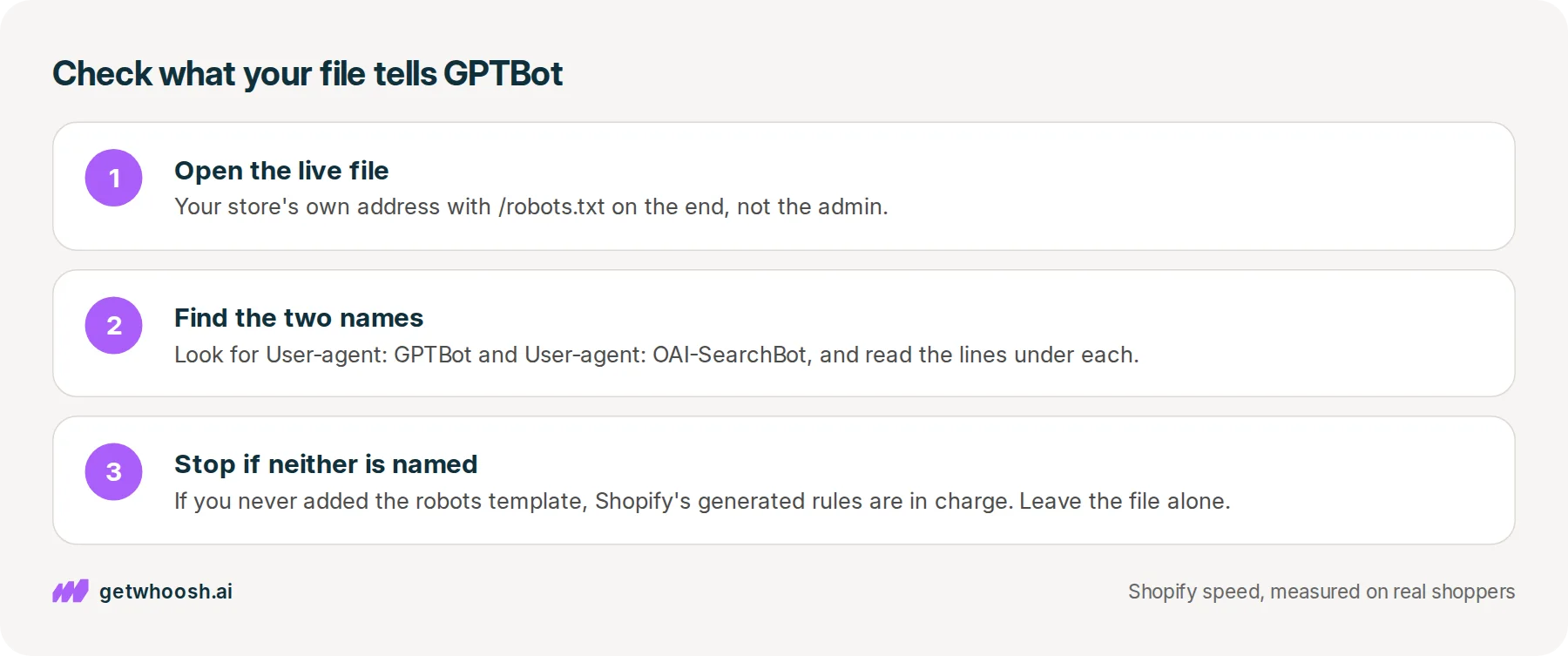
Type the address a customer would use for your store, the one with your own domain rather than the admin, then add
/robots.txtto the end and press enter. You will see plain text, and that text is the live file every named crawler reads. -
Look for a line that says
User-agent: GPTBotand another that saysUser-agent: OAI-SearchBot, then read theAlloworDisallowlines right under each, because those lines are what that reader is told about the blanket’s product page. -
If neither name is there, the file Shopify generates is still in charge, both readers can request the blanket, and you can stop here without editing anything.
If one of the names is there with Disallow: /, the file was customised at some point. Before you change it, decide which half you meant: no to training, or no to search. If you want her to find the blanket in ChatGPT, OAI-SearchBot is the name that has to stay open.
Say you want GPTBot kept out of training and the blanket left in search. Shopify’s developer guide shows the shape for a reader the default rules do not name: a User-agent: line with its name, then Disallow: / to keep it out, or Allow: / to let it in. Its example reader is called discobot, and GPTBot would sit in the same spot.
To add that, Shopify’s help page says you go to Online Store in the admin, open your theme’s Edit code, click Add a new template, select robots, and click Create template. The same page calls this an unsupported customisation, says Shopify Support can’t help with edits to it, and warns that incorrect use can result in loss of all traffic.
That warning is why the next step matters. Shopify’s template guide says the new template replaces the file Shopify generates and isn’t in any theme by default, so save a copy of your current /robots.txt and compare it with the new one before you publish.
Shopify recommends making these changes in Liquid, the template language your theme is written in, and strongly advises against wiping the template and typing plain text rules instead, because those rules can go out of date. After you publish, OpenAI’s crawler page says it can take about 24 hours for its search systems to adjust, so give it a day before you ask ChatGPT about the blanket again.
Whoosh does not edit this file. There is nothing to install for this check.
You can stop when the live file names neither reader, or names them the way you meant. If the blanket still isn’t in her answer after that day, the file has done its part. Letting OAI-SearchBot in means it can read the page, and ChatGPT still chooses what to show, so the next place to look is the blanket’s title, photos, and price in your admin.
Questions merchants ask
Does blocking GPTBot stop Google from showing my store?
No. GPTBot is OpenAI's training crawler, and a group that starts with its name speaks only to GPTBot. Google sends its own crawlers, and they follow their own group or the general rules.
Will every AI crawler obey my robots.txt?
Not necessarily. Shopify's help page says the rules in your robots.txt are directional and advisory, and not all crawlers are guaranteed to follow them. It is a request that well-behaved crawlers honour, not a lock.
I can't find robots.txt in my theme files. Is something missing?
No. Shopify generates the file for you, and the template that changes it is not in any theme until someone adds it. The text at your own domain with /robots.txt on the end is the file that counts.
Should I block OAI-SearchBot as well as GPTBot?
Only if you want your store out of ChatGPT search answers. OpenAI says sites that opt out of OAI-SearchBot are not shown in those answers, though they can still appear as navigational links. If you want shoppers to find your products there, leave it open.
Sources (4, checked 21 Oct 2026)
- 1 OpenAI on its crawlers and user agents (developers.openai.com, checked 21 Oct 2026)
- 2 Shopify developer docs on the robots.txt.liquid template (shopify.dev, checked 21 Oct 2026)
- 3 Shopify developer docs on customising robots.txt (shopify.dev, checked 21 Oct 2026)
- 4 Google Search Central introduction to robots.txt (developers.google.com, checked 21 Oct 2026)
What each OpenAI crawler does comes from OpenAI's crawler page. Shopify's default rules and the template steps come from Shopify's help page and developer docs. No store data was used.
How posts are chosen, sourced, checked and corrected: our editorial policy.
Written by Edward Cameron Founder, Whoosh, Sydney, Australia
Edward Cameron is the founder of Whoosh, the Shopify speed app made in Sydney and on the Shopify App Store since August 2025. He writes here about what slows a Shopify product page and how to check it on your own store.
Keep reading
All posts
Agentic commerce 6 min read
What is a ChatGPT shopping assistant?
Someone asks ChatGPT for a rain jacket and gets a row of product cards. If you sell on Shopify, your jacket can already be one of them, built from your admin. When she taps it, your own product page opens, and that is the page to check.

Agentic commerce 6 min read
What is the Agentic Commerce Protocol?
Your customer asks ChatGPT for the blue runners, and before it can buy them the chat has to ask your store a few questions. That's the Agentic Commerce Protocol. On Shopify, Shopify answers for you, so your part is one admin screen and the page the chat sends them to.

Agentic commerce 6 min read
What should your Shopify homepage meta description say?
A shopper searching for sustainable clothes reads one line under your homepage link before they tap. Here is what that line should say about your whole store, where Shopify keeps it, and what the homepage has to show next.
