 Start Free Trial
 What is a ChatGPT shopping assistant?
Someone asks ChatGPT for a rain jacket and gets a row of product cards. If you sell on Shopify, your jacket can already be one of them, built from your admin. When she taps it, your own product page opens, and that is the page to check.

Edward Cameron · Founder, Whoosh
6 min read

In short
A ChatGPT shopping assistant is ChatGPT helping someone shop. She asks for a rain jacket, and it shows a few products as cards with a photo, a name, and a price. On Shopify, your products can already be in that list, built from the title, photos, price, and stock in your admin. ChatGPT chooses which to show. When she taps yours, your own product page opens, so the jacket photo has to come first.
- When a shopper asks ChatGPT for something like a rain jacket, it shows product cards, and eligible Shopify stores are already in that list with no app to install.
- The card is built from the title, photos, price, and stock in your Shopify admin, and ChatGPT decides which products make the row.
- Tapping the card opens your own product page inside the ChatGPT app, or in a new tab on a computer, and she pays in your checkout.
- Check one product: ChatGPT is on in the admin, the first photo shows the product itself, and that photo is on screen before any popup.
She asks ChatGPT for a rain jacket
Picture someone who keeps getting caught in the drizzle on the walk to work. She opens ChatGPT on her phone and asks for a rain jacket for less than $200.
ChatGPT answers the way a good shop assistant would. It shows her a short row of jackets as cards, each with a photo, a name, and a price, and one of those jackets is yours.
That is what people mean by a ChatGPT shopping assistant. It lives in ChatGPT rather than on your store, and it finds jackets, lines them up, and lets her pick one before she has ever visited a shop. If you sell on Shopify, your products can already be in that row.
She likes the look of your jacket, so she taps it. Your own product page opens, and the photo she just saw in the chat has to be the first thing she sees there too.
How your jacket gets onto that card
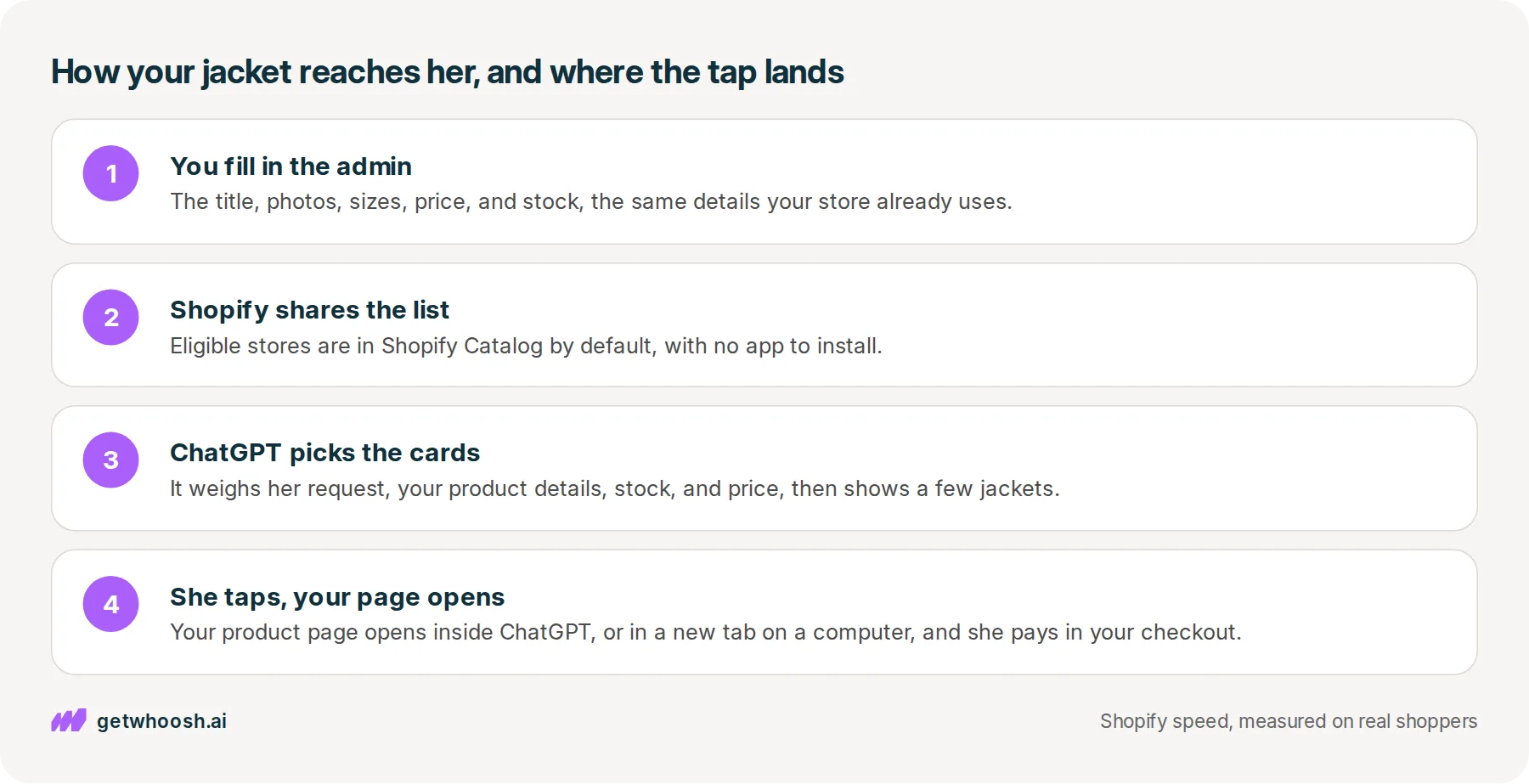
So where did ChatGPT get your jacket’s photo and price? From you, mostly. Shopify’s article on Catalog says it starts from what you already keep in the admin: the title, description, photos, category, sizes and colours, price, and stock.
Shopify gathers those details from eligible stores into one product list for these chats, and that list is called Shopify Catalog. When she asked for a jacket, that list is where ChatGPT went looking.
Then ChatGPT does the choosing. The same article says each chat decides which products to show and how to rank them, weighing her request, how good your product details are, availability, price, shipping, and a few other things. Being in the list does not guarantee your jacket makes the row.
So you write the card, and ChatGPT decides whether she sees it.
How did your store get into that list without you doing anything? On 24 March 2026, Shopify said products show up in ChatGPT by default through Agentic Storefronts, the admin setting that shares your products with the chats.
That same post says there are no separate integrations, no apps, and no transaction fees beyond the standard processing rates you already pay on any sale.
Next up is the tap. Shopify’s March post also says ChatGPT opens your store in a browser inside the app, and on a computer it opens your store in a separate tab.
Either way, she is on your real product page now, with your theme and every app you have installed. Shopify’s post on ChatGPT says checkout finishes on your own site, so your prices, your payment methods, and your brand stay as they are.
Check your store's real numbers
The free Whoosh audit measures your store on real shopper data, names the scripts in the way, and estimates what the delay is costing. No install, about a minute.
Free. No install. Results in about a minute.
What you can leave alone, and what the tap opens
This is the useful part, because most of the work is already done. You do not install an app, you do not upload a spreadsheet of your products, and you do not write special descriptions for ChatGPT.
The details you keep for your own store are the details the card is built from.
Shopify’s guide to how this works says it is live for Shopify stores selling to US buyers, whatever country the store is in, and there is no monthly subscription for the channel.
You may have read about a Buy button that takes payment right inside the chat. That is a separate buy button for approved stores, and for ChatGPT on Shopify, the same guide says checkout happens on your own store, with no separate switch to turn on.
What you still have to get right is the jacket, in two places. The first is the admin, because the card reads from it. Shopify’s Catalog article asks for photos of the product itself, not only lifestyle shots, and for price and stock that are kept current.
That second request matters more than it sounds. If the card told her the jacket is in stock at a price, and your page says something else, she has a reason to go back to the chat and tap someone else’s.
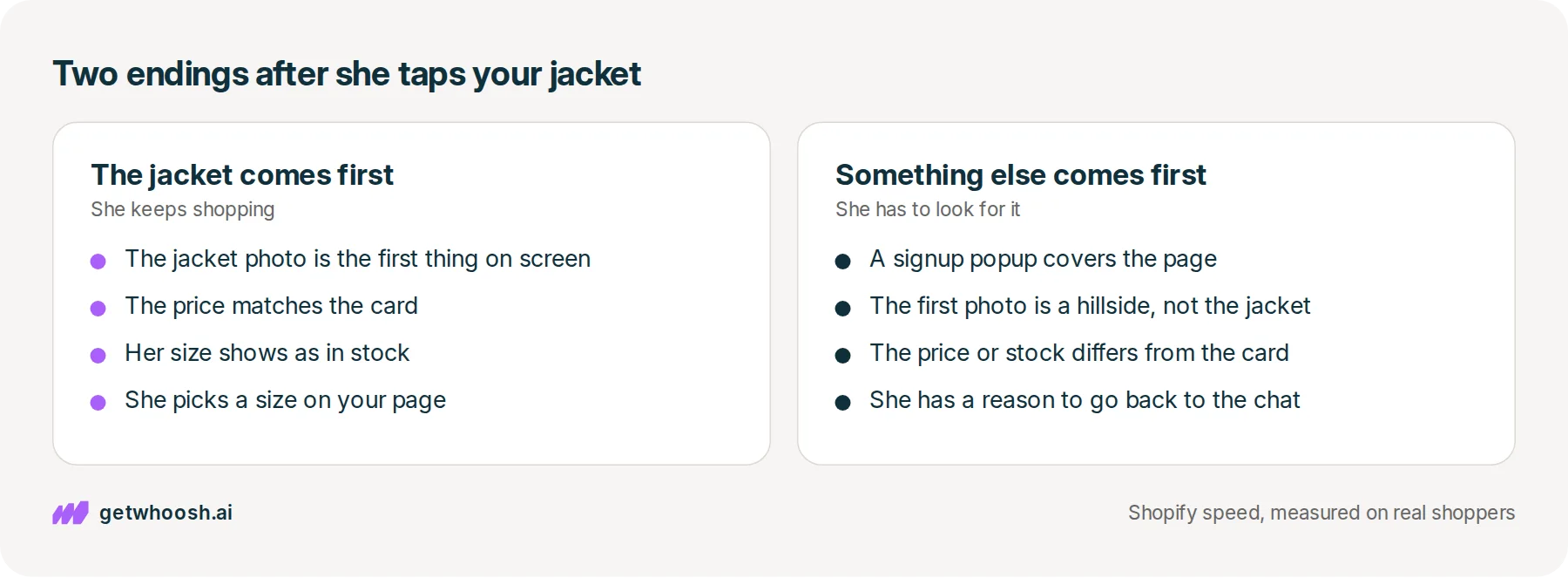
The second place is the page the tap opens, and this is where the two endings split.
In the good ending, your product page opens and the jacket photo is the first thing on screen. The price matches the card, her size is there, and she keeps shopping on your store.
In the other ending, a signup popup lands before the photo does, or the first photo is a model on a hillside where the jacket is hard to make out. She came from a card that showed her exactly what she wanted, and now she has to look for it.
I know what you’re thinking. ChatGPT already showed her the jacket, so why does the page matter that much? Because the chat only found it. The sale happens on your page, on her phone, in a small browser, with every app you have installed loading as the page opens.
Check your jacket the way she will see it
OK, so here is the check, in the order you would click it, on one product. Pick the jacket, or whichever product you would most like to see in that row.
-
In the Shopify admin, open Settings, then Sales channels, then Agentic Storefronts, which is where Shopify’s guide says you manage these chats, and make sure ChatGPT is on.
-
Open the jacket in Products and read it the way she would. Does the title say rain jacket, or only a name you made up? Check the price and the stock for each size, and make sure the first photo shows the jacket itself.
-
Open the live product page on your phone, using the address a customer would use rather than the theme editor. Reload it and watch what lands first. The jacket photo should be on screen before any popup or chat bubble.
If the photo is slow to appear even with nothing in front of it, the file may be bigger than her phone needs, and why image optimization still leaves photos slow walks through that one.
That last look is where Whoosh fits. It does not put your jacket in ChatGPT, and it does not choose which jackets ChatGPT shows.
What it does is AI Page Preloading. It learns from real visits which photo shoppers see first on each product page, then tells the browser to fetch that photo early, so the jacket is ready sooner when she lands from the chat.
AI Page Preloading is US$99 a month on the Shopify App Store, with a 7-day free trial.
You can stop when the admin matches the page and the jacket is the first thing she sees. If a popup still gets there first, the next suspect is the app that runs that popup.
Questions merchants ask
Do I need an app to show up in ChatGPT?
No. Shopify shares eligible stores' products with ChatGPT by default through Agentic Storefronts, so there is nothing to install. You can confirm it is on in the Shopify admin under Settings, then Sales channels, then Agentic Storefronts.
Can I make sure ChatGPT shows my product?
No one can promise that. Shopify's Catalog article says being in the list does not guarantee a product appears, and each chat decides what to show. What you control is a clear title, a first photo that shows the product, and a price and stock count that are right.
Is this the same as a chat box on my own website?
No. A chat box on your own site is a different product. It answers questions once someone is already on your store. The ChatGPT shopping assistant is where she starts, before she has seen your store at all.
How do I know a sale came from ChatGPT?
Shopify says orders arrive in the admin with ChatGPT shown as where the sale came from. Open the order and look at its source. You are still the seller, so the customer and the order are yours.
Does the browser inside ChatGPT show my popups and other apps?
Yes. It opens your real store, so your theme, your popups, your reviews, and your chat bubble all load the way they do for any visitor. That is why the jacket photo still has to come first.
Sources (4, checked 4 Oct 2026)
- 1 Shopify blog on selling through ChatGPT (shopify.com, checked 4 Oct 2026)
- 2 Shopify news on shopping in ChatGPT, March 2026 (shopify.com, checked 4 Oct 2026)
- 3 Shopify on what Catalog is (shopify.com, checked 4 Oct 2026)
- 4 Shopify on how agentic commerce works (shopify.com, checked 4 Oct 2026)
How the product cards and the tap work comes from Shopify's blog posts on ChatGPT, Shopify Catalog, and agentic commerce, and Shopify's March 2026 news post. No store data was used.
How posts are chosen, sourced, checked and corrected: our editorial policy.
Written by Edward Cameron Founder, Whoosh, Sydney, Australia
Edward Cameron is the founder of Whoosh, the Shopify speed app made in Sydney and on the Shopify App Store since August 2025. He writes here about what slows a Shopify product page and how to check it on your own store.
Keep reading
All posts
Agentic commerce 6 min read
What is ChatGPT Instant Checkout?
Someone finds your product in ChatGPT and taps Buy. Instant Checkout lets approved stores take that payment inside the chat. On most Shopify stores, the tap opens your own product page instead, so that page is where the sale happens.

Agentic commerce 6 min read
What is the Agentic Commerce Protocol?
Your customer asks ChatGPT for the blue runners, and before it can buy them the chat has to ask your store a few questions. That's the Agentic Commerce Protocol. On Shopify, Shopify answers for you, so your part is one admin screen and the page the chat sends them to.

Agentic commerce 6 min read
What should your Shopify homepage meta description say?
A shopper searching for sustainable clothes reads one line under your homepage link before they tap. Here is what that line should say about your whole store, where Shopify keeps it, and what the homepage has to show next.
