 Start Free Trial
 What is ChatGPT Instant Checkout?
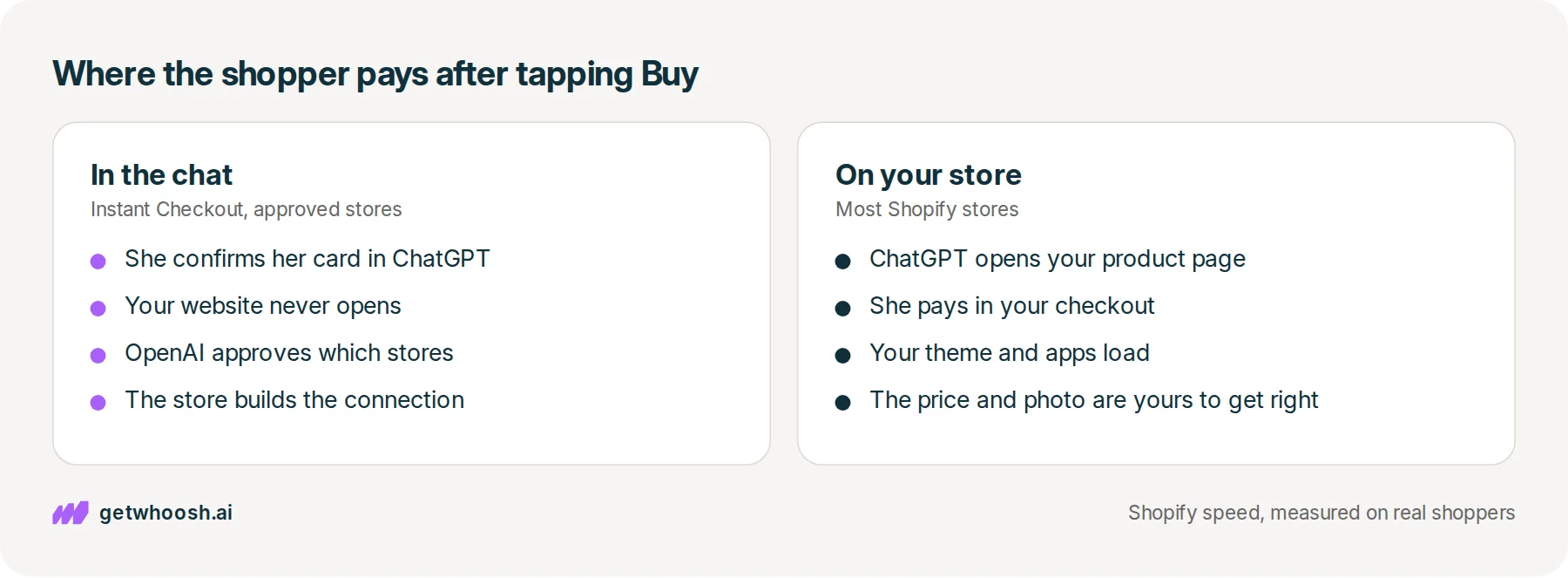
Someone finds your product in ChatGPT and taps Buy. Instant Checkout lets approved stores take that payment inside the chat. On most Shopify stores, the tap opens your own product page instead, so that page is where the sale happens.

Edward Cameron · Founder, Whoosh
6 min read Updated

In short
ChatGPT Instant Checkout is a Buy button that lets someone pay for your product without leaving the chat, so your website never opens. OpenAI only gives it to stores it has approved. On most Shopify stores, the same tap opens your own product page inside the ChatGPT app, and they pay in your checkout. That page has to show the price the chat quoted, and the product photo before any popup.
- Instant Checkout lets a shopper pay inside ChatGPT, and OpenAI's guide limits it to approved stores.
- On Shopify, the Buy tap opens your own product page in a browser inside ChatGPT, or in a new tab on a computer.
- ChatGPT reads your title, price, photos, and stock from the Shopify admin, so that is where you keep them right.
- Check one product page: it should match the admin, and the product photo should load before any popup.
She finds your mug in ChatGPT and taps Buy
Picture someone shopping for her dad’s birthday. She asks ChatGPT for a speckled ceramic mug, something handmade that holds a proper amount of tea, and one of the mugs it shows her is yours. She likes it, so she taps Buy.
What happens after that tap is what ChatGPT Instant Checkout is about. In the Instant Checkout version, she pays right there in the chat and your website never opens. That version is real, but OpenAI decides which stores get it, and most Shopify stores do not have it.
On a Shopify store, the same tap opens your own product page, inside the ChatGPT app. She pays in your checkout, the way any other visitor would. So for most of you, the part worth getting ready is the page she lands on.
What happens between the chat and your checkout
Let’s start with how ChatGPT knew about your mug at all. Shopify hands the chats a tidy copy of your products, built from the title, price, photos, and stock you already keep in the admin. Shopify’s article on Catalog calls that copy Shopify Catalog, and it is what ChatGPT searched when she asked for a mug.
Next up is the tap. When Stripe announced the Buy button on 29 September 2025, it let people in the United States pay sellers on Etsy without leaving the chat, and it listed Shopify stores as coming soon. She would confirm her address and card inside ChatGPT, and the store would take the payment and post the mug.
That in-chat payment is what the name Instant Checkout means. OpenAI’s guide for stores still says the button is only for approved partners, with a form to apply. It also says a store has to build three connections to ChatGPT to support it, which is developer work, not a setting.
Those connections are the Agentic Commerce Protocol, if you want the longer version of how a chat places an order. For your mug, the part that matters is where she ends up paying.
Here’s the catch for a Shopify store. On 24 March 2026, Shopify said people shopping in ChatGPT find its stores’ products through Catalog, then finish the purchase in a browser built into the ChatGPT app. On a computer, ChatGPT opens your store in a new tab instead.
Either way, she is on your store now. She sees your price, your payment options, and every app you have installed, because it is the same product page everyone else gets.
Check your store's real numbers
The free Whoosh audit measures your store on real shopper data, names the scripts in the way, and estimates what the delay is costing. No install, about a minute.
Free. No install. Results in about a minute.
Why your product page is now the checkout
This is the useful part, because it means there is nothing to apply for. The same March post from Shopify says products show up in ChatGPT by default through Agentic Storefronts, the admin setting that shares your products with the chats, with no separate app and no transaction fees beyond normal card processing.
When she pays, the order lands in your admin marked as coming from ChatGPT, and you are still the seller.
I know what you’re thinking. Wouldn’t the in-chat button be better, since she never has to wait for a page? For the stores that have it, maybe. But OpenAI decides who gets it, and the page she lands on is yours to fix today.
The chat does the finding. Your product page does the selling, and it has two jobs once she arrives.
First, the page has to agree with the chat. She was just told a price, and that the mug is in stock, and Shopify’s Catalog article puts it plainly: a buyer shown the wrong price or a sold-out item is a buyer who does not check out.
Because the chat reads your admin, the fix lives there. Keep the title, price, and stock right in Shopify, and you do not have to write anything special for ChatGPT.
Second, the mug has to show up first. She has already seen the photo in the chat, and now she is on her phone, in a small browser, waiting to see it again. If a signup popup or a chat bubble loads before the photo, the first thing she meets on your store is something she did not ask for.
Open the page the chat will open
OK, so here is the check, in the order you would click it, on one product.
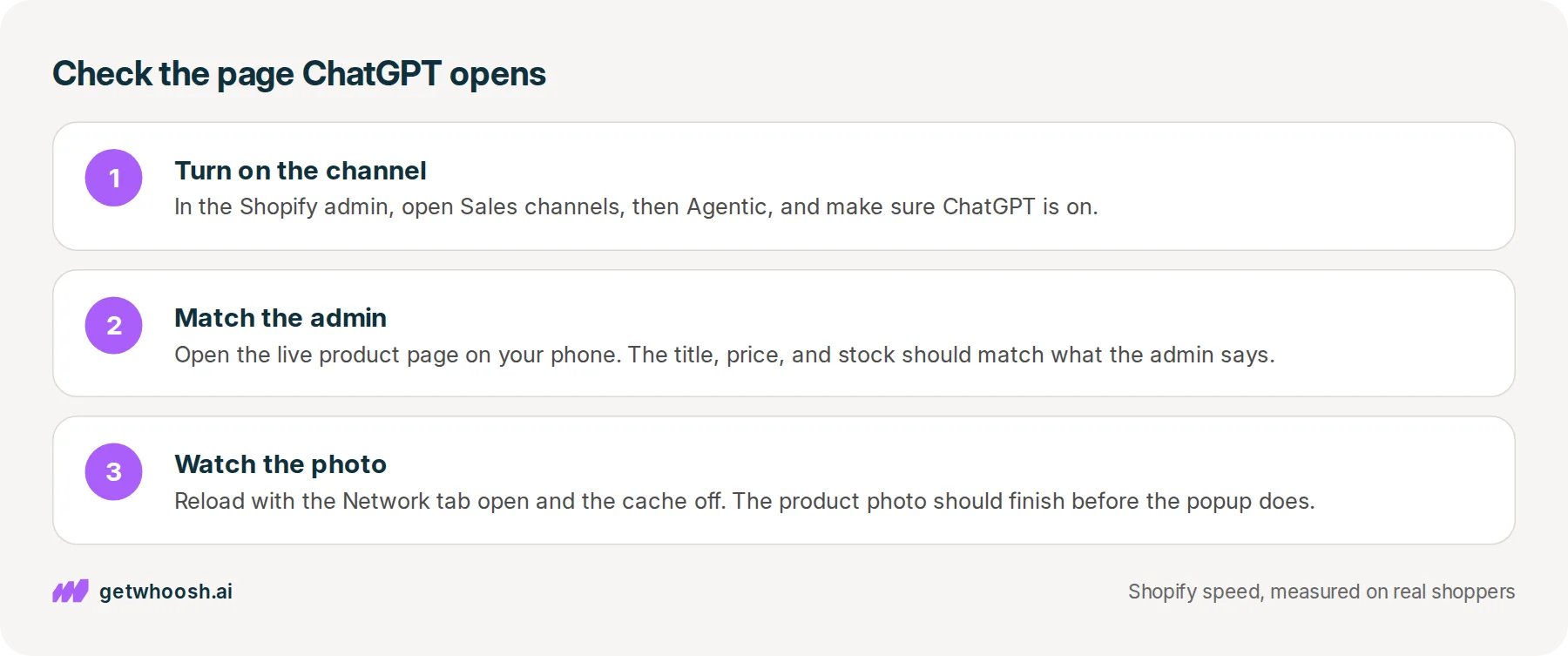
Start in the Shopify admin. Open Sales channels, then Agentic, which is where the Catalog article says you choose which chats can use your products, and make sure ChatGPT is on. It is a switch in the admin, not code you paste into the theme.
Then pick your mug and open its live product page on your phone, using the address a customer would use. Skip the theme editor, because it often hides your apps.
Check the title, the price, and whether the colour she would pick is in stock, and make sure all three match the admin. A product priced at zero can be left out of Catalog altogether.
Last, but not least, watch the photo. On a computer, right-click the page and choose Inspect, which opens a panel of tools beside it. Click the Network tab, which is the list of every file the page asks for, then tick Disable cache so the page loads fresh, like it would for her.
Reload, find the mug photo in that list, and see whether the popup or the chat bubble finished before it.
Google wants the main photo on screen within 2.5 seconds for most real visits, and its guide to that photo says the browser should ask for it early, not after the other files. If the mug shows up late, the next suspect is whichever app got in ahead of it.
That last step is where Whoosh fits. It does not get you the in-chat button, and it does not send your products to ChatGPT.
Smart App Loading makes the popup, the chat bubble, and the other extra apps wait until the product photo is on screen, and it works alongside those apps without removing them or copying your theme. Smart App Loading is US$99 a month with a 7-day free trial.
You can stop when the admin and the page agree, and the mug is the first thing she sees. If an email signup popup is the one getting in first, whether Klaviyo slows the page walks through that one app.
If the photo itself is heavy, why image optimization still leaves photos slow is the next read. And the speed check measures the page the chat opens.
Questions merchants ask
Can I apply for the Buy button inside ChatGPT?
OpenAI's guide for stores has a form, and says Instant Checkout is for approved partners. Supporting it means building connections between your store and ChatGPT, which is developer work. Most Shopify stores do not need it to sell in ChatGPT, because the Buy tap already opens their own store.
Does the browser inside ChatGPT show my popups and other apps?
Yes. It loads your real store, so the theme, the popup, the reviews, and the chat bubble all run the way they do for any visitor. That is why the product photo still has to come first.
Why does ChatGPT show a different price from my store?
ChatGPT reads the price from your Shopify admin through Catalog, and Shopify's Catalog article says a chat can otherwise lean on an old copy of a page. Change the price on that product in the admin, then reload the live product page and make sure both agree.
How do I know an order came from ChatGPT?
Shopify's March 2026 post says orders arrive in the admin with ChatGPT marked as where the sale came from. Open the order and look at its source. You will not see a separate Shopify fee for it beyond normal card processing.
Will making a popup wait break my checkout?
No. Leave Shopify's payment buttons and checkout alone, and only make the extras wait, like the signup popup and the chat bubble. Then place one test order through ChatGPT yourself and follow the whole trip.
Sources (6, checked 28 Sept 2026)
- 1 Stripe newsroom on Instant Checkout in ChatGPT (stripe.com, checked 28 Sept 2026)
- 2 OpenAI's guide for stores on Instant Checkout (developers.openai.com, checked 28 Sept 2026)
- 3 Shopify news on shopping in ChatGPT, March 2026 (shopify.com, checked 28 Sept 2026)
- 4 Shopify on what Catalog is (shopify.com, checked 28 Sept 2026)
- 5 web.dev on Web Vitals thresholds (web.dev, checked 28 Sept 2026)
- 6 web.dev on optimizing LCP (web.dev, checked 28 Sept 2026)
What happens after the Buy tap comes from Stripe's September 2025 announcement, OpenAI's guide for stores, Shopify's March 2026 news post, and Shopify's Catalog article. No store data was used.
How posts are chosen, sourced, checked and corrected: our editorial policy.
Written by Edward Cameron Founder, Whoosh, Sydney, Australia
Edward Cameron is the founder of Whoosh, the Shopify speed app made in Sydney and on the Shopify App Store since August 2025. He writes here about what slows a Shopify product page and how to check it on your own store.
Keep reading
All posts
Agentic commerce 6 min read
What is a ChatGPT shopping assistant?
Someone asks ChatGPT for a rain jacket and gets a row of product cards. If you sell on Shopify, your jacket can already be one of them, built from your admin. When she taps it, your own product page opens, and that is the page to check.

Agentic commerce 6 min read
What is the Agentic Commerce Protocol?
Your customer asks ChatGPT for the blue runners, and before it can buy them the chat has to ask your store a few questions. That's the Agentic Commerce Protocol. On Shopify, Shopify answers for you, so your part is one admin screen and the page the chat sends them to.

Agentic commerce 6 min read
What should your Shopify homepage meta description say?
A shopper searching for sustainable clothes reads one line under your homepage link before they tap. Here is what that line should say about your whole store, where Shopify keeps it, and what the homepage has to show next.
