 Start Free Trial
 Stop chasing your Shopify speed score. Measure what Google measures.
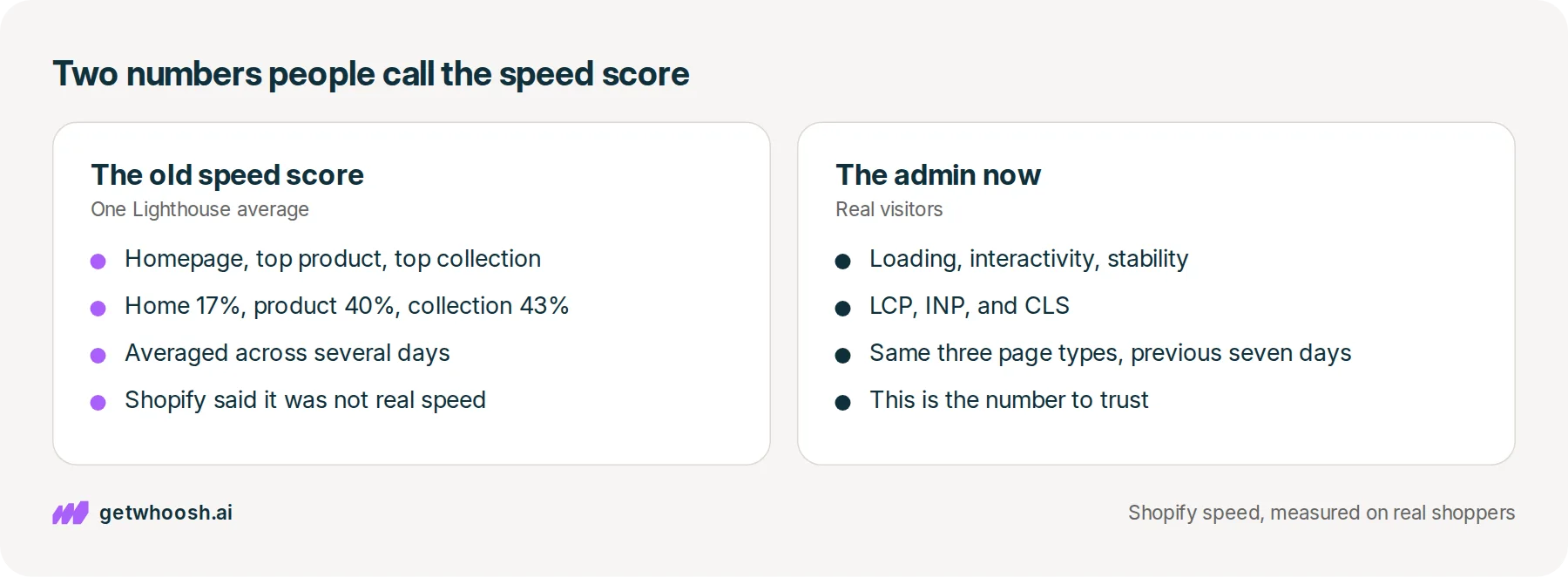
Shopify speed score has meant a Lighthouse average, and it now means three figures from real visitors. They are not the same number, and only one of them is the target.

Edward Cameron · Founder, Whoosh
5 min read

In short
A Shopify speed score has been two different things. The old one was a Lighthouse average of the homepage, the top product page, and the top collection page, and Shopify replaced that single score with three Core Web Vitals from real visitors. The 0 to 100 in PageSpeed is still a lab test of one URL. Read the three visitor ratings in the admin first. Use the lab score only to see which file is in the way.
- The old Shopify speed score was one Lighthouse average of the homepage, the top product page, and the top collection page.
- On 31 January 2024 Shopify replaced that single score with three Core Web Vitals from real visitors.
- PageSpeed's 0 to 100 is still a lab test of one URL. Shopify says lab scores can differ a lot from real visits.
- Read loading, interactivity, and visual stability in the admin before you chase a single number.
The name is used for two different numbers
A Shopify speed score is not one measurement. Shopify has used that name for a Lighthouse average, and it now shows something else in the admin: three figures from real visitors.
If you treat every 0 to 100 as the same thing, you will fix a simulation and miss the visits that actually paid.
The mix-up looks like this. You paste the homepage into PageSpeed and get a 54. You open the Themes page and loading is marked good. Those are not a contradiction.
The 54 is one simulated load of the page you pasted. The old weighting already treated the homepage as 17 percent of the score, because the product and collection pages are where people buy. The Themes rating is real visitors on those pages, over the previous seven days. Raising the homepage simulation until it says 90 does not move a rating your shoppers produced on the product page.
The number Shopify retired
Shopify’s February 2024 explanation of the old speed score says it was a weighted average of Google Lighthouse scores for three URLs: the homepage, the product page with the most traffic over the previous seven days, and the collection page with the most traffic. The same article says that score is an average of several days of Lighthouse runs, because a single run moves around, and that the score is not directly correlated with actual speed. It is weighted toward page structure and content.
Shopify’s current theme docs still describe that weighting. Home is 17 percent, the product page is 40 percent, and the collection page is 43 percent, because collection and product pages matter more to conversion than the homepage. That is why pasting only the homepage into a tester answers a question about the least important of the three pages.
On 31 January 2024 Shopify’s performance team said the previous speed score used a single Lighthouse score, and that Lighthouse does not represent real visits. They replaced it with a web performance dashboard of real user data. The February 2024 article says the dashboard replaces the single speed score with three Core Web Vitals scores.
Check your store's real numbers
The free Whoosh audit measures your store on real shopper data, names the scripts in the way, and estimates what the delay is costing. No install, about a minute.
Free. No install. Results in about a minute.
The numbers in the admin now
The dashboard reports how real visitors experienced the store. Shopify’s theme docs say it is real user monitoring of Largest Contentful Paint, Interaction to Next Paint, and Cumulative Layout Shift, split by page type, device, and region. Shopify’s 2026 guide to site speed says the performance score uses the homepage, the most visited product page, and the most visited collection page, from the previous seven days.
The three ratings on the Themes page are loading, interactivity, and visual stability. Anything not marked good is the opportunity. With little traffic the line jumps day to day, so Shopify suggests grouping by week or month before you react to one afternoon.
The thresholds for “good”, from web.dev:
Google Search uses those real-user figures as a page-experience signal. It does not use a Lighthouse score of 90 as the ranking input.
PageSpeed is still the lab test
PageSpeed Insights still gives you a 0 to 100 from Lighthouse, for the one URL you paste. Shopify’s theme docs say Lighthouse scores can differ a lot from real user data, because the lab test is one device on a simulated network, and your visitors are not. Use the lab run to see which image, script, or stylesheet is in the way. Use the admin report, or Search Console’s Core Web Vitals report, to decide whether visitors are actually getting a slow page.
A store can look fine in one Lighthouse run and fail Largest Contentful Paint for real mobile visitors, because the test never loaded the product page those visitors land on. Another can look poor in the lab and pass for real visitors on fast phones. Read the field block at the top of PageSpeed before you read the score.
What to do with a bad real-user number
Start in the admin, not in a third-party tester. On the Themes page, read the three ratings: loading, interactivity, visual stability. Then open Analytics, then Reports, and look at the same three for mobile, on the product page before the homepage. The old weighting already said the product and collection pages carry most of the score. The 2026 guide still builds the admin view from those same three page types.
If the report says there is not enough data, you do not have a verdict yet. Group by week, as Shopify suggests, or read the field block at the top of PageSpeed for the product URL. That block is real Chrome visitors to that URL. The 0 to 100 under it is the simulation.
If loading is the one marked poor, the usual cause on a product page is the main image waiting on other files. Find that file in the Network panel before you install anything. Whether Klaviyo slows the store is that check for one common script. Which speed app matches which job is how to avoid buying a CSS minifier when the file in the way is an app script.
If the real-user numbers are already good, a disappointing Lighthouse score is not a project. Shopify said the single score was the wrong target. The three visitor ratings are the ones they put in its place.
Whoosh measures those real visits and runs a 50/50 test of conversion and bounce on your own store. It sequences known third-party scripts so they do not race the product image, and it does not copy the theme. Smart App Loading is US$99 a month. Whoosh Max, which also preloads the real product image and the likely next page, is US$149 a month, with a 7-day trial on every plan.
Questions merchants ask
What is a Shopify speed score?
It has been two different numbers. The old one was a Lighthouse average of the homepage, the top product page, and the top collection page. On 31 January 2024 Shopify replaced that single score with three Core Web Vitals from real visitors. The 0 to 100 in PageSpeed is still a lab test of one URL.
Which Shopify speed number should I trust?
The three ratings in the admin: loading, interactivity, and visual stability. Those come from real visits. Use a Lighthouse run to see which image, script, or stylesheet is in the way. Do not use that lab score as the target.
Why is my homepage a 54 when the Themes page says good?
The 54 is one simulated load of the page you pasted. The Themes rating is real visitors, mostly on the product and collection pages, over the previous seven days. Raising the homepage lab score does not move a rating your shoppers produced on the product page.
What replaced the old Shopify speed score?
A web performance dashboard of real user data: Largest Contentful Paint, Interaction to Next Paint, and Cumulative Layout Shift. Shopify said the single Lighthouse score was not directly correlated with how fast the store actually felt.
Sources (6, checked 24 Sept 2026)
- 1 Shopify on the old speed score (shopify.com, checked 24 Sept 2026)
- 2 Shopify theme docs on testing performance (shopify.dev, checked 24 Sept 2026)
- 3 Shopify performance team on retiring the speed score (performance.shopify.com, checked 24 Sept 2026)
- 4 Shopify on site speed in 2026 (shopify.com, checked 24 Sept 2026)
- 5 web.dev on Web Vitals thresholds (web.dev, checked 24 Sept 2026)
- 6 Google Search Central on Core Web Vitals (developers.google.com, checked 24 Sept 2026)
Figures are from the public pages linked below. No unpublished merchant data.
How posts are chosen, sourced, checked and corrected: our editorial policy.
Written by Edward Cameron Founder, Whoosh, Sydney, Australia
Edward Cameron is the founder of Whoosh, the Shopify speed app made in Sydney and on the Shopify App Store since August 2025. He writes here about what slows a Shopify product page and how to check it on your own store.
Keep reading
All posts
Speed apps & tools 7 min read
Which Shopify speed optimization app should you install?
Every speed app on the Shopify App Store promises a faster store. Each one clears a different thing out of your product photo's way, and one look at your own product page tells you which one you need.

Apps & scripts 6 min read
Does Klaviyo slow down your Shopify store?
You added Klaviyo so you can reach shoppers after they leave. That needs a small program on the product page, and it only slows the store when it starts before the product photo.

Core Web Vitals 6 min read
Whoosh vs Yottaa: what the free plan does
Yottaa's free plan tells you which apps your product photo is waiting on. Making those apps wait is the paid part, and on Yottaa it is billed by page views. Whoosh does that waiting at the same price every month.
