 Start Free Trial
What Shopify title tag length should a product use?
A shopper on a phone searches for a weekender bag and reads a column of blue links. Each one is a title tag, and the phone cuts the end off. Here is how long yours should be, and what has to come first.

Edward Cameron · Founder, Whoosh
6 min read

In short
A product's title tag is the blue link a shopper taps in Google. Name the product in the first few words and put your store name last, because the phone cuts the end off a long title. Shopify suggests about 60 characters as a working target, counting spaces and the store name, but Google has no fixed limit, so the order of the words matters more than the count.
- The blue link a shopper taps in Google is the product's title tag. You set it in the Page title box under Search engine listing preview on the product.
- Google cuts the blue link to fit the phone, and Shopify's working target is about 60 characters including spaces and the store name, so put the bag's name first.
- Shopify themes add a dash and your store name on the end unless the box already contains it. Check View page source before you type the store name yourself.
- Google may show the heading above the photo instead of a vague or repeated title, so the product's main Title should name the bag too.
A shopper on a phone searches for a weekender bag
A shopper types “waxed canvas weekender” into Google on their phone and gets a column of blue links. Each blue link is a page’s title tag, the short name you give that page for search, and the phone cuts the end off a long one. So your olive weekender’s title should name the bag in its first few words, with your store name last.
How long is that in characters? Shopify’s guide to website titles suggests 60 characters as a working target, counting spaces and your store name, and says a title under 60 characters can still be cut off. Treat the number as a guide, and the first few words as the part that has to survive.
The shopper does not open every link to compare bags. They read down the column and tap the one that sounds like the bag they pictured, so the words in that blue link are doing the selling before your product page has loaded a single photo.
Where the weekender’s blue link comes from
So where do the words in that blue link come from? Mostly from a box in your admin, one the shopper never sees on the product page itself.
Open the weekender in your Shopify admin and scroll to the bottom of the product details page. Shopify’s guide points to the section called Search engine listing preview, and inside it is a box called Page title. The words you type there become the bag’s title tag, and they show up in the browser tab and in Google rather than above the photo.
Your theme then adds something on the end. Shopify themes put a dash and your store name after the words in that box, unless the box already contains your store name, in which case they leave it alone.
Shopify’s developer page on theme metadata shows that rule in the theme’s own code, and Shopify’s guide says to check the published title before you type the store name in yourself.
So if you type Olive Waxed Canvas Weekender Bag and nothing else, the shopper’s phone is sent that, then a dash, then your store name. You wrote the bag. The theme wrote the signature.
Google still has the last word on what the shopper sees. Google’s page on the blue link, which it calls a title link, says it builds that link from several places, starting with the title tag and including the main heading and other big, prominent text. The preview in your admin is a guess, and Google decides the final line.
The grey sentence under the blue link is a separate box, and the meta description example post covers what to write there. This post stays on the blue link.
Check your store's real numbers
The free Whoosh audit measures your store on real shopper data, names the scripts in the way, and estimates what the delay is costing. No install, about a minute.
Free. No install. Results in about a minute.
Why the bag has to come before the cut
But here’s the catch. Nobody can tell you the exact letter where the shopper’s phone will stop. Google’s page says there is no limit on how long a title tag can be, and that the blue link is cut as needed to fit the width of the device.
Writing a long title breaks nothing. The end of it simply never reaches the person holding the phone. That is why the 60 in Shopify’s guide is a working target rather than a rule, because a narrow screen can still cut a title under 60 characters.
So the order matters more than the count. Picture two titles for the same olive weekender. One opens with a friendly line about weekends away and gets to the bag later. The other opens with the bag.
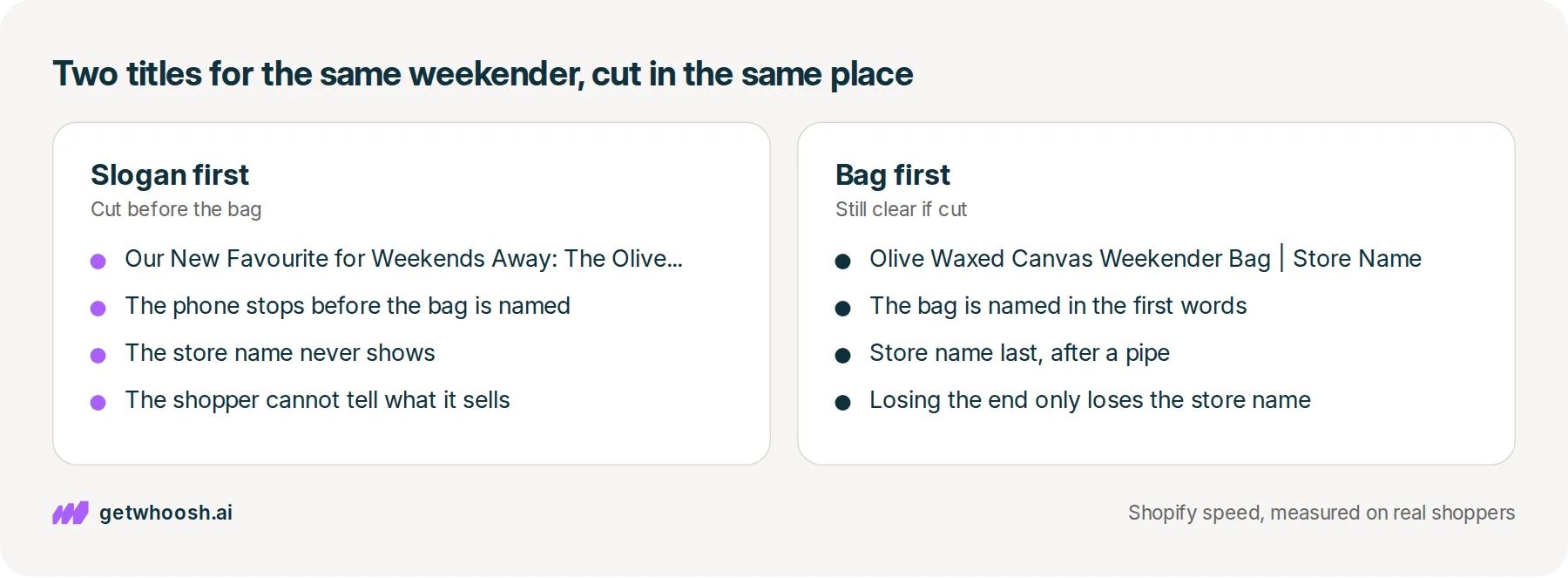
Put the bag first, in the words someone would type into Google, then your store name at the end after a pipe or a dash. That is the order Shopify’s guide gives for product pages. The store name is there for someone who already knows you, and it is also the cheapest part of the line to lose.
There is a second reason to name the bag plainly. Google’s page says it may write its own blue link when a title does not match what the page shows, or when many pages share the same repeated wording, and it pulls the replacement from headings and other prominent text on the page.
If every bag in your range carries the title Weekender Bags, Google has to guess which one this page is, and it may reach for the heading instead. That heading is the main Title field on the product, which Shopify’s guide says usually supplies the name shown above the photo.
Some of you are wondering why you would bother, if Google can swap your words anyway. Because the problems on Google’s list are titles that fail to describe the page, so a line that names the olive waxed canvas weekender gives it the least reason to look elsewhere. If it does look, the product’s main Title should name the bag as well.
Fix the weekender’s title, then search for it on your phone
Start with the weekender itself. Open Products, click the weekender, and scroll to Search engine listing preview on the product details page. That is the preview Shopify’s guide names, and the Page title box is inside it. Read what is already in that box before you change anything, because it may be a long product name or a line copied from another bag.
Now type the bag first, in the words a shopper would search for, such as Olive Waxed Canvas Weekender Bag. Leave your store name out for the moment, because the next step tells you whether the theme already adds it, then click Save.
Next up, the live page. On a computer, open the weekender’s product page, right-click an empty spot, and choose View page source, which shows the raw text your store sent to the browser. Press Ctrl+F, or Command+F on a Mac, and search for <title>, which is the step Shopify’s guide gives for reading the published title.
The words between the opening and closing title tags are what Google is handed. If you see the bag followed by a dash and your store name, the theme has done its part and the box stays as it is.
If the store name is missing from that live title, go back to the Page title box and add it at the end after a pipe. If the live title already ends with your store name, leave the name out of the box. Shopify’s guide says not to type it again when the theme already adds it.
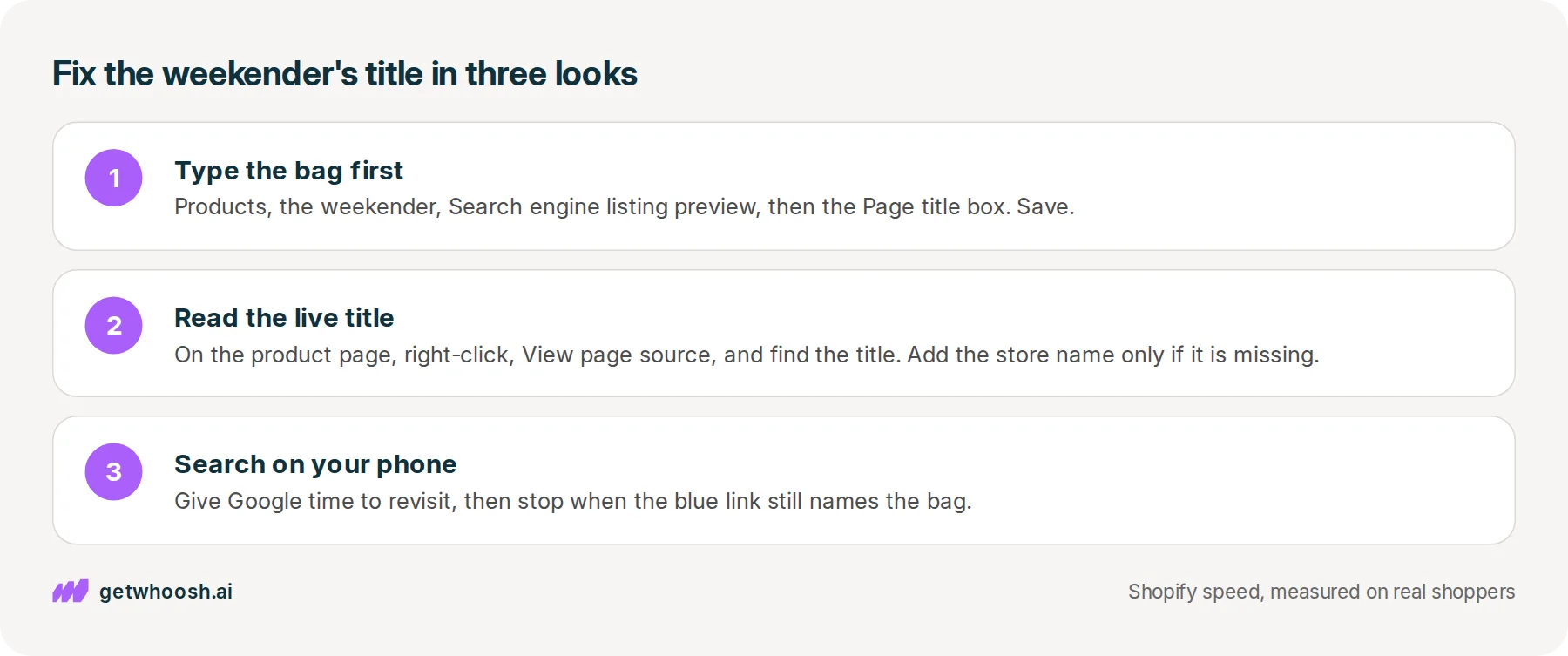
Last, but not least, pick up your phone and search for the bag the way the shopper would. Google has to revisit the page before a new title shows, and Google’s page says that can take a few days to a few weeks, so give it time before you judge the change.
Your homepage title lives on a different screen in the admin, and the homepage meta description post shows where. Every product page has its own Page title box, though, and each bag gets the same three looks as the weekender.
You can stop when the blue link on your phone still names the olive waxed canvas weekender before it runs out of room. If the cut lands in the middle of the bag’s name, shorten the words in front of it. If Google shows a different line altogether, read the name above the bag’s photo, because that heading is what Google borrowed.
Questions merchants ask
Is the Page title the same as the product name above the photo?
Not quite. The main Title field on the product usually supplies the name shown above the photo, and the Page title box sets the title tag that appears in the browser tab and in Google. They can use the same words. The Page title is the one to keep short, with the bag first.
Can I read the title in the browser tab instead of the page source?
The tab shows the same title tag, so opening the weekender's page and reading the tab is a quick first look. A tab is narrow and often cuts the line short, though, so View page source is where you see the whole title, including whether the store name is on the end.
Can similar bags in my range share one title?
Give each its own. Google's page on title links lists repeated wording across many pages as a common reason it writes its own blue link instead. If two weekenders differ by colour, put the colour in each title so the shopper can tell which link is which.
Will a better title move my bag up the results?
Shopify's guide says a new title does not guarantee higher rankings, and that Google has to revisit the page and may still write a different blue link. What a clear title changes is what the shopper reads before they decide to tap.
Sources (3, checked 15 Nov 2026)
- 1 Google Search Central on title links in search results (developers.google.com, checked 15 Nov 2026)
- 2 Shopify on what a website title is, with examples (shopify.com, checked 15 Nov 2026)
- 3 Shopify developer docs on theme SEO metadata (shopify.dev, checked 15 Nov 2026)
The olive waxed canvas weekender is an example, not a real store. The 60 character target and the admin steps come from Shopify's guide to website titles, the store name rule from Shopify's theme docs, and how Google builds and cuts the blue link from Google's page on title links.
How posts are chosen, sourced, checked and corrected: our editorial policy.
Written by Edward Cameron Founder, Whoosh, Sydney, Australia
Edward Cameron is the founder of Whoosh, the Shopify speed app made in Sydney and on the Shopify App Store since August 2025. He writes here about what slows a Shopify product page and how to check it on your own store.
Keep reading
All posts
Agentic commerce 6 min read
What should your Shopify homepage meta description say?
A shopper searching for sustainable clothes reads one line under your homepage link before they tap. Here is what that line should say about your whole store, where Shopify keeps it, and what the homepage has to show next.

Agentic commerce 6 min read
Does Shopify collection schema list your products?
A shopper opens your Dinner plates collection. Behind the page sits a hidden note for search engines, and on Dawn it names your store, not the plates. Here is where the plate's own note lives, and the two searches that show you both.

Agentic commerce 6 min read
What does a meta description checker tell you about your Shopify store?
You paste your spatula's link into a meta description checker and get a length score. Here is what that score reads, where Shopify already shows the same line, and why it is not the line Google prints.
